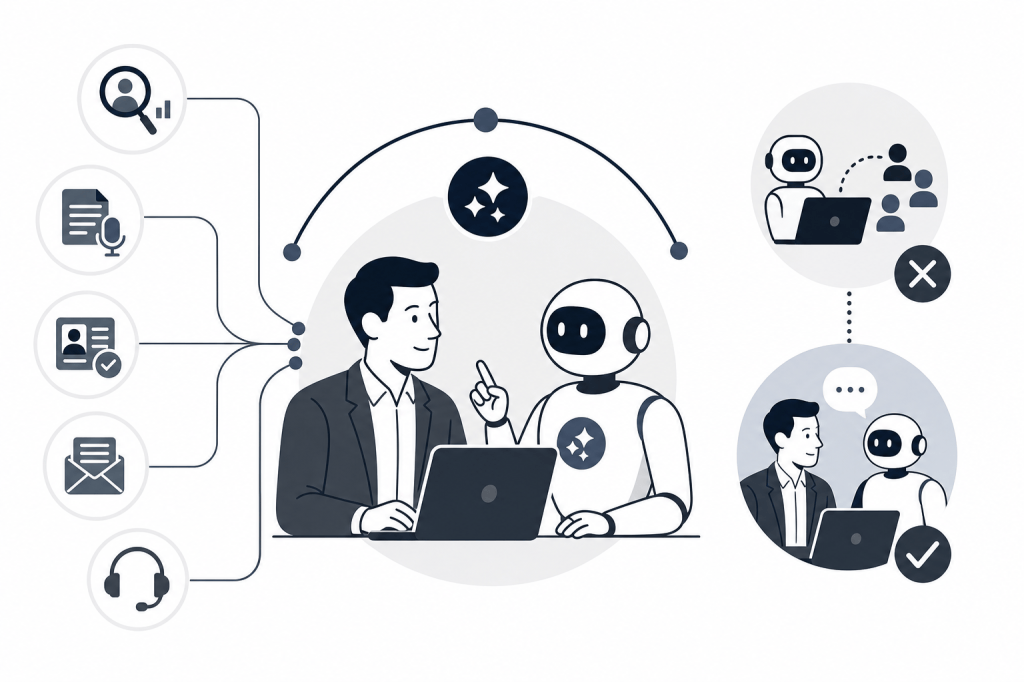
An AI sales assistant is software that augments a sales rep's workflow by automating research, note-taking, CRM updates, and outreach drafts. It handles repeatable, data-heavy tasks so reps spend more time selling. Knowing where these tools stop being useful is what separates teams that get real value from them from teams that end up frustrated.
What Is an AI Sales Assistant?
An AI sales assistant is a software layer that sits inside a sales rep's existing workflow and handles tasks that eat time without requiring human judgment. Think pre-call research, logging call notes, updating CRM fields, and drafting follow-up emails. The rep still owns the relationship; the assistant handles the administrative work around it.
AI sales assistants are also different from general writing tools. A writing assistant can help you draft an email, but it has no awareness of your deal stage, the contact's recent activity, or your company's messaging. An AI sales assistant connects those dots because it has access to your actual sales data.
The core promise is augmentation. The assistant reduces the cognitive load of repetitive tasks, giving reps more capacity for the parts of selling that actually require a human: listening, building trust, and navigating complex decisions.
What Is the Difference Between an AI Sales Assistant and an AI SDR?
The distinction comes down to one word: autonomy. An AI sales assistant works alongside a human rep, handling tasks the rep assigns or that trigger automatically from rep activity. The rep stays in control of every decision. An AI SDR, by contrast, is designed to act independently, prospecting, qualifying, and booking meetings without a human in the loop.
A survey by SalesAPE of 250 US sales professionals found that 59.3% fear AI will make their jobs redundant within two years. That fear is largely aimed at AI SDRs, which are built to replace parts of the top-of-funnel human role. AI sales assistants are built differently: they assume a human is present and make that human more effective.
In practice, the line can blur. Some tools marketed as AI SDRs are used primarily as assistants because teams keep a human reviewing every outbound message before it sends. Some assistants include light autonomous features, like auto-logging a call summary, that run without any human trigger. What matters is where human oversight sits in the workflow.
For most B2B sales teams, the assistant model is the safer starting point. Autonomous outreach carries reputational risk if the AI misjudges tone, timing, or relevance. An assistant surfaces the draft; the rep decides whether to send it. That checkpoint is small but meaningful, especially in enterprise deals where a single poorly timed email can close a door.
The AI SDR model makes more sense for high-volume, low-complexity outreach where speed matters more than nuance. The assistant model fits better when deal complexity is high, relationships are long-cycle, or the brand depends on consistent, human-feeling communication.
Core Capabilities: What an AI Sales Assistant Actually Does
AI sales assistants cluster around five functional areas, each targeting a specific category of repetitive work that pulls reps away from active selling.
1. Pre-call research and contact enrichment
Before a meeting, an assistant can pull together a brief on the prospect: recent company news, LinkedIn activity, funding history, and any prior interaction data from your CRM. This work typically takes a rep 15 to 30 minutes manually. The assistant does it automatically, often before the rep even opens their calendar.
2. Meeting recording, transcription, and summarization
During and after calls, assistants capture what was said and produce structured summaries with action items. Avoma, for example, records and transcribes sales meetings and provides automated summaries and performance scoring. This removes the need to take notes during a call and gives reps an accurate record to reference later.
3. CRM hygiene and data entry
Keeping CRM records current is one of the most time-consuming and least-loved parts of a sales role. Assistants can auto-populate fields from call transcripts, update deal stages, and flag records that are missing key data. Pipedrive AI Sales Assistant goes further, analyzing pipeline data to suggest next actions, identify patterns in won deals, and predict win probability. The quality of these outputs depends directly on how clean and complete your CRM data already is.
4. Outreach drafting and sequencing
Assistants can draft personalized emails and follow-up messages based on deal context, persona, and stage. Regie.ai manages the full outreach process, including email sequencing, personalization, and social media generation. It is marketed as an AI SDR but is frequently used in an assistant capacity, with a human reviewing messages before they go out.
5. In-call coaching and deal intelligence
Some tools provide real-time support during a live call. Dialpad surfaces live AI coaching, real-time battle cards triggered by keywords, sentiment analysis, and automated call recaps. Salesforce Einstein and Agentforce surface high-intent accounts, automate prospecting research, and provide embedded summarization for leads and contacts, though they work best for teams already running deep Salesforce infrastructure.
AI-assisted forecasting is one area where the accuracy gains are measurable. Research from 2026 indicates that AI-assisted forecasts typically reach 79% accuracy, compared to roughly 51% for traditional gut-based methods, according to automatetoprofit.com. Treat that figure as indicative rather than a fixed benchmark, but the directional difference is consistent with what practitioners report.
For a broader look at how these capabilities fit into a full sales workflow, the guide to AI agents for sales reps covers how the assistant layer connects to the rest of the rep's toolkit.
What an AI Sales Assistant Cannot Do
AI sales assistants handle data and repetition well. They struggle with anything that requires reading a person, adapting in real time, or making a judgment call that depends on context no database can capture.
Here is where the limits show up most clearly:
Negotiation and complex objection handling. When a prospect pushes back on price or raises a concern tied to their specific internal politics, the response has to be calibrated to that person, that moment, and that relationship. An assistant can surface talking points, but it cannot read hesitation in a voice, notice that the tone shifted, or decide how hard to push.
Building trust over time. Trust in a sales relationship comes from consistency, follow-through, and the sense that the rep genuinely understands the buyer's situation. An AI can draft a thoughtful message, but the buyer knows a person has to stand behind it. Research from 2026 indicates that roughly 19% of B2B buyers lose confidence when they recognize that content was generated by AI. That figure argues for human oversight on every outbound message, not for avoiding AI tools entirely.
Reading room dynamics. In a multi-stakeholder meeting, a skilled rep notices who defers to whom, who went quiet after a certain topic, and who needs more reassurance before the group will move forward. No assistant has access to that layer of information.
Strategic account decisions. Deciding when to walk away from a deal, how to sequence a multi-threaded enterprise sale, or whether a relationship is worth a discounted renewal requires business judgment and relationship history that goes beyond what any model can synthesize.
Personalization at the edge cases. Assistants do well with templated personalization: inserting company news, referencing a shared connection, noting a recent funding round. They do less well when the right move is unusual: a handwritten note, a call at an unexpected time, a reference to something the prospect mentioned offhand six months ago.
Use the assistant to arrive more prepared and follow up more consistently. Keep the human fully in charge of the conversation.
How to Add an AI Sales Assistant to Your Workflow
Adding an AI sales assistant works best as a phased adoption, not a full replacement of existing habits on day one. The steps below follow the order a rep or team would actually work through them.
-
Audit your current workflow for the highest-friction tasks. Before you install anything, write down the three or four tasks that consume the most time without requiring judgment: pre-call research, post-call note entry, CRM field updates, follow-up drafts. These are the tasks an assistant should own first. If you skip this step, you risk adopting a tool that automates something that was not actually a bottleneck.
-
Clean your CRM data before connecting any AI tool. Every assistant that touches your pipeline depends on the quality of what is already there. Incomplete contact records, duplicate entries, and stale deal stages will produce inaccurate outputs. Spend time before the rollout removing duplicates, filling in missing fields, and archiving dead deals. This is not glamorous, but it is the single most important factor in whether the assistant's outputs are trustworthy.
-
Connect the assistant to your calendar and email first. Most assistants start earning their value through meeting prep and post-call summaries. Connecting calendar and email is lower-risk than CRM write access and gives you a chance to evaluate output quality before the tool touches your pipeline data.
-
Set a review checkpoint for every AI-generated output. Decide upfront that no AI-drafted email goes out without a human reading it, and no CRM update goes unreviewed for the first 30 days. This is not about distrust; it is about calibrating the tool to your specific deals, personas, and tone before you extend more autonomy to it.
-
Expand to CRM sync and outreach drafts after you trust the output. Once you have seen 30 to 60 days of meeting summaries and can judge their accuracy, extend the assistant's access to CRM updates and outbound drafts. Review those outputs for another 30 days before reducing the frequency of your checks.
-
Measure the right things. Track time saved on administrative tasks, CRM data completeness, and follow-up response rates, not just whether the tool is being used. If CRM completeness improves and follow-up response rates hold steady or improve, the assistant is doing its job.
The goal is a workflow where the assistant handles repeatable work reliably enough that you stop thinking about it, freeing your attention for the conversations and decisions that actually move deals forward.
Data Privacy and Security: What to Check Before You Buy
Any AI sales assistant you connect to your email, calendar, and CRM will have access to sensitive deal data, prospect information, and internal communications. Before you commit to a vendor, work through these questions:
Compliance certifications. Ask whether the vendor holds SOC 2 Type II certification. This is the baseline for B2B SaaS tools handling business data. If the vendor cannot produce a current report, that is a meaningful gap.
Data storage and retention. Find out where your data is stored, for how long, and whether you can delete it on request. Some vendors retain transcripts and contact data indefinitely unless you explicitly request deletion. Confirm the retention policy in writing.
Training data use. Ask directly whether your data is used to train the vendor's AI models. Many vendors use customer data to improve their models by default. If that is not acceptable for your organization, you need a contract clause that opts you out.
Access controls. Check whether the tool supports role-based permissions so that not every user can see every deal or contact. For teams, this matters when you have reps, managers, and leadership all using the same platform.
Integration security. When the assistant connects to your CRM or email, confirm it uses OAuth or a similarly secure authorization method rather than storing your credentials directly.
Vendor subprocessors. Enterprise buyers should ask for a list of third-party subprocessors the vendor uses. If the assistant routes your data through multiple downstream services, each of those is a potential exposure point.
Working through this checklist before a trial or purchase is especially important if your organization handles regulated data or operates under strict privacy rules.
How Baxter Works as an AI Agent for Sales Reps
Baxter is an AI agent for sales reps that connects to a user's calendar, email, and CRM to handle research, meeting support, and post-call tasks automatically, without waiting for manual prompts. Where point-solution assistants cover one phase of the sales cycle, Baxter works across all three: before, during, and after every meeting.
Before a call, Baxter builds a contact and company brief by pulling from over 12 external data sources, including LinkedIn and Crunchbase, alongside internal tools like Gmail and Slack. During the call, it records and transcribes the conversation. After it ends, Baxter drafts follow-up emails and syncs notes directly to HubSpot, so the rep's CRM stays current without manual entry.
The always-on model matters because the gaps between tools are where work falls through. A rep juggling five separate point solutions still has to move information between them manually. Baxter handles that connective work in the background.
Pricing starts at $0/month on the Free plan, which includes pre, during, and post-meeting intelligence, CRM sync, and the Baxter Agent. The Pro plan runs $44/seat/month and adds unlimited meeting transcription, unlimited in-person capture, and unlimited Ask Baxter. Teams of 10 or more can move to the Business plan at $89/seat/month, which adds unlimited CRM sync, unlimited storage, organization controls, workspaces, and MCP access. Organizations of 400 or more can contact Baxter for Enterprise pricing, which includes unlimited Baxter Intelligence, enterprise-grade security, custom data retention, and priority support.
FAQs
Which AI sales assistant is the best for a small sales team?
The best fit depends on where your team loses the most time. If post-call admin is the main drain, a meeting-focused tool like Avoma handles recording, transcription, and summaries well. If CRM hygiene is the bigger problem, a pipeline-integrated assistant like Pipedrive AI Sales Assistant may serve you better. Small teams with limited budgets should look for tools that offer a free starting tier so they can test output quality before committing to a paid plan.
Can an AI sales assistant replace a human SDR entirely?
No. An AI sales assistant is built to support a human rep, not replace one. It automates research, note-taking, CRM updates, and outreach drafts, but it cannot negotiate, handle complex objections, or build the kind of trust that moves enterprise deals forward. An AI SDR is a different category of tool designed for autonomous top-of-funnel work, but even those carry reputational risk if no human reviews the outbound messages before they send.
How accurate is AI-assisted sales forecasting compared to manual forecasting?
Research from 2026 indicates that AI-assisted forecasts typically reach 79% accuracy, compared to roughly 51% for traditional gut-based methods. Treat that as directional rather than a fixed benchmark, since accuracy varies by data quality and deal complexity. The more complete and current your CRM data is, the more reliable the AI's forecasting outputs will be.
Does an AI sales assistant work if my CRM data is incomplete or outdated?
It works, but the outputs will reflect the gaps. An assistant pulling from stale or incomplete records will produce inaccurate summaries, suggest wrong next steps, and populate fields with bad data. Before connecting any AI tool to your CRM, clean up duplicate records, fill in missing contact fields, and archive dead deals. The assistant amplifies whatever is already there, good or bad.
What integrations should I look for in an AI sales assistant?
At minimum, look for calendar, email, and CRM integration. Those three connections cover the core workflow: meeting prep, communication history, and pipeline data. Integrations with tools like Slack and data sources like LinkedIn add context that makes outputs more accurate. Confirm that the tool uses secure authorization methods like OAuth for each connection, and ask whether it supports two-way CRM sync or only reads from the record.
Conclusion
An AI sales assistant automates the repeatable, data-heavy work around a sales rep's day: research, note-taking, CRM updates, and outreach drafts. It does not replace the rep's judgment in a negotiation, the trust built over a long relationship, or the ability to read what is actually happening in a room. The tools that deliver real value are the ones used as a support layer, not a substitute for human selling.
Before you evaluate any tool, audit your own workflow. Write down the three tasks that consume the most time without requiring judgment, then look for an assistant that handles those specifically. Start with calendar and email access, review every output for the first 30 days, and expand the tool's access only after you trust what it produces.


Leave a Reply