- What Sales Workflow Automation Actually Means
- Step 1: Automate Pre-Meeting Research
- Step 2: Automate Meeting Capture
- Step 3: Automate Post-Meeting Follow-Up
- Step 4: Connect the Workflow End to End
- Step 5: Choose the Right Automation Layer for Your Workflow
- What to Automate First
- Building a Sustainable Automation System
- Frequently Asked Questions
Sales workflow automation is how modern deal teams stop losing hours to admin and start spending that time on the relationships that actually close business. If you're a founder carrying your own pipeline, a Principal at a PE firm, or a partner at a boutique advisory, you already know the pattern: prep takes too long, notes never make it into HubSpot, and follow-ups sit in drafts until the moment has passed.
This guide walks through each stage of the sales workflow, what can be automated at each step, and how to build a system that runs in the background so you can focus on the conversation itself.
What Sales Workflow Automation Actually Means
Automation in a sales context doesn't mean replacing relationships. It means removing the manual work that surrounds them — the research before a meeting, the note-logging after, the follow-up email you're writing at 10pm when you should be moving on to the next deal.
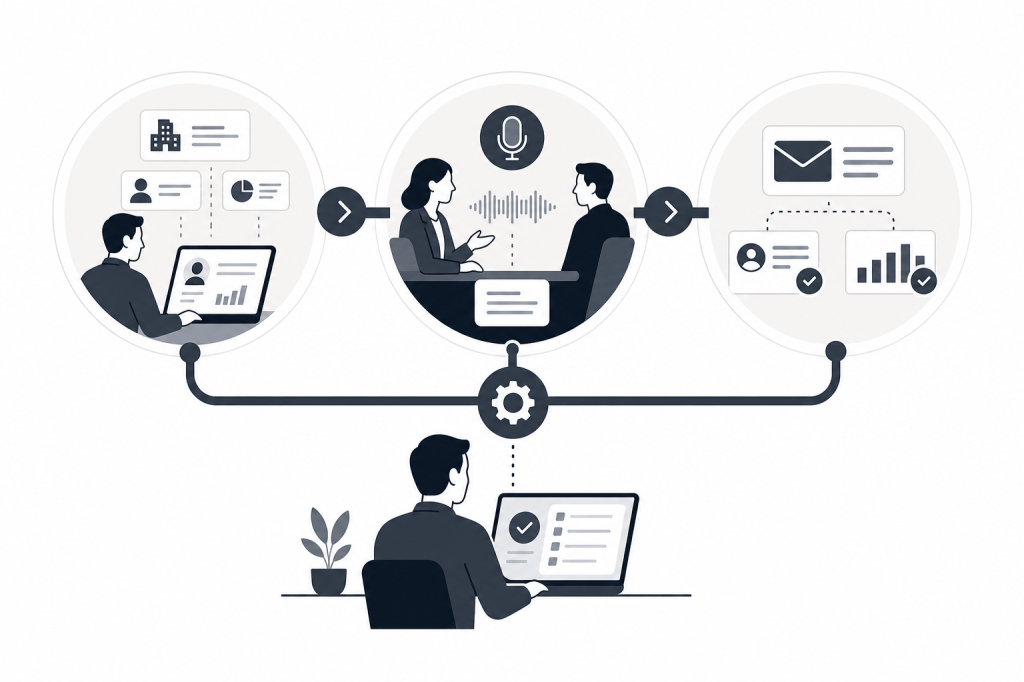
A well-automated sales workflow handles three distinct phases:
- Pre-meeting: Research, briefing, and context gathering
- During the meeting: Recording, transcription, and real-time notes
- Post-meeting: Follow-up drafts, CRM updates, and next-step task creation
Most tools only address one or two of these. The friction usually lives in the gaps between them.
Step 1: Automate Pre-Meeting Research
This is where most sales workflows break down first. You have a call in 45 minutes. You need to know who you're meeting, what their company has been up to, whether there's been recent funding activity, and what your email history looks like. Pulling that together manually from LinkedIn, Crunchbase, and your inbox takes 20 to 40 minutes on a good day.
Pre-meeting automation solves this by building a briefing before the meeting starts — without you asking for it. The key word is "before." A tool that summarizes a meeting after the fact isn't doing pre-meeting research; it's doing post-meeting cleanup.
What a strong pre-meeting automation layer should do:
- Pull contact and company data from external sources like LinkedIn and Crunchbase
- Surface relevant email history and prior meeting notes
- Flag recent news, funding rounds, or signals about the contact's firm
- Deliver a briefing automatically, triggered by your calendar
Baxter connects to your calendar and pulls from 12+ external data sources to build this briefing without any manual prompts. The AI agent runs in the background, so by the time you open your laptop before a call, the context is already there.
Step 2: Automate Meeting Capture
Recording and transcription have become table stakes. Most tools in the category offer them — Fathom, Fireflies.ai, Avoma, and others. The real question is what happens to the transcript afterward.
A basic transcription tool gives you a text file. A stronger automation layer structures that transcript into action items, extracts key decisions, and routes information to the right place — without you having to comb through 40 minutes of text to find the three things that mattered.
For in-person meetings, the same principle applies. If your automation only works on video calls, you're missing a significant portion of your relationship-driven deal activity.
What to look for in meeting capture automation:
- Automatic transcription with structured summaries
- In-person capture capability, not just video calls
- Action item extraction that doesn't require manual review
- Notes formatted for CRM entry, not just stored as raw text
Step 3: Automate Post-Meeting Follow-Up
This is where the most time gets lost. After a good meeting, you need to send a follow-up email, log notes in HubSpot, create tasks for next steps, and possibly add new contacts to your pipeline. That's 30 to 60 minutes of work per meeting, and it compounds fast across a full deal calendar.
Post-meeting automation should handle all of this without you rebuilding it from scratch after every call.
Follow-Up Email Drafts
A strong automation layer drafts the follow-up based on what was actually discussed — not a generic template with a name swapped in, but a draft that references the specific topics, commitments, and next steps from that conversation.
This matters more than it sounds. A follow-up that lands within an hour of the call, while the conversation is still fresh for both parties, performs differently than one sent the next morning.
CRM Sync
HubSpot records go empty for one reason: logging notes manually is friction, and friction gets skipped when the day is full. Automated CRM sync removes that friction entirely.
Two-way sync matters here. You want meeting notes to push into HubSpot, but you also want HubSpot context to inform your next meeting prep. A one-directional push is better than nothing; a two-way sync is the actual solution.
Baxter's native two-way HubSpot sync handles this automatically, so deal context accumulates in your CRM without anyone having to log it by hand.
Prospect List Building
Post-meeting automation can also generate pipeline, not just update existing records. If a meeting surfaces referrals, related companies, or new contacts worth pursuing, an automated system can build a prospect list from that context rather than leaving it as a mental note that gets forgotten.
Step 4: Connect the Workflow End to End
The three steps above are only as useful as the connections between them. A pre-meeting briefing tool that doesn't share context with your post-meeting summary means you're still doing integration work manually. A transcription tool that doesn't sync to HubSpot means your CRM stays empty.
The most effective sales workflow automation runs as a single connected system across all three phases. When evaluating tools, the question isn't just "does this do transcription" or "does this sync to my CRM." It's whether the same system that briefed you before the meeting is also the one drafting your follow-up and updating your HubSpot record afterward.
That end-to-end connection is what separates a collection of point tools from an actual operating system for your sales workflow.
Step 5: Choose the Right Automation Layer for Your Workflow
Not every tool covers the full workflow. Here's a practical breakdown of where common options fit:
Lightweight note-takers (Fathom, Fireflies.ai, Otter.ai): Strong on transcription and post-meeting summaries. No pre-meeting research layer. No autonomous outreach drafting. Useful if transcription is your only gap — less useful if you need the full workflow covered.
Conversation and revenue intelligence platforms (Avoma, Read.ai): More comprehensive on the during and post-meeting side. Avoma includes scheduling, coaching, and revenue intelligence features. Neither offers autonomous pre-meeting briefings sourced from external data, and neither generates outreach drafts or prospect lists as part of the post-meeting workflow.
Full-workflow AI operating systems: Cover pre-meeting research, live capture, and post-meeting execution in a single connected product. This is where Baxter sits. The AI agent operates without manual prompts across all three phases — pulling from external sources like LinkedIn and Crunchbase before the meeting, then drafting follow-ups and syncing to HubSpot after it.
For relationship-driven professionals at PE and VC firms, boutique advisories, and founder-led sales teams, the pre-meeting layer is often the most valuable piece. It's the one that changes the quality of the conversation itself, not just the efficiency of the admin that follows.
What to Automate First
If you're building a sales workflow automation system from scratch, don't try to automate everything at once. Start with the step that costs you the most time or creates the most risk.
For most deal professionals, that's one of two things:
- Pre-meeting prep — if you're regularly walking into calls without enough context
- CRM logging — if your HubSpot records are empty and deal history is living in people's heads
Both are solvable with the right automation layer. Once those two are running cleanly, adding meeting capture and follow-up drafting becomes straightforward because the data infrastructure is already in place.
Building a Sustainable Automation System
The goal isn't to automate for its own sake. It's to free up the time and attention that relationship-driven work actually requires. A partner at a PE firm who walks into every meeting fully briefed, follows up within the hour, and maintains a complete HubSpot record for every contact isn't working harder than one who doesn't. They're working with better infrastructure.
Done well, sales workflow automation makes the relationship work better — not less human. The research still informs your judgment. The follow-up still carries your voice. The CRM still reflects your deal activity. The difference is that none of it requires you to spend the hour between calls doing data entry.
If you want to see how this works end to end, Baxter offers a free plan that includes pre-meeting intelligence, CRM sync, and the Baxter Intel Agent at no cost.
Frequently Asked Questions
What is sales workflow automation?
Sales workflow automation is the use of software to handle repetitive, time-consuming tasks across the sales process — including meeting research, note-taking, CRM updates, and follow-up drafting. The goal is to reduce manual admin so sales professionals can focus on the conversations and relationships that drive deals forward.
Which parts of the sales workflow can be automated?
The three phases that benefit most from automation are pre-meeting research and briefing, live meeting capture and transcription, and post-meeting tasks like follow-up email drafts, CRM logging, and prospect list building. Tools vary significantly in which phases they cover.
How does automated CRM sync work?
Automated CRM sync connects your meeting notes, transcripts, and action items directly to your CRM records without manual data entry. A two-way sync also pulls existing CRM context into your pre-meeting briefing, so information flows in both directions.
What's the difference between a note-taking tool and a full sales workflow automation system?
A note-taking tool records and transcribes meetings and may push a summary to your CRM. A full sales workflow automation system also handles pre-meeting research, operates without manual prompts, and generates post-meeting outputs like follow-up email drafts and prospect lists. The distinction matters most for deal professionals who need context before the meeting, not just a record of it afterward.
Do I need to manually prompt AI meeting tools to generate summaries?
It depends on the tool. Most require some manual configuration or prompting to generate summaries and push them to a CRM. Baxter's AI agent operates autonomously — handling pre-meeting briefings, live capture, and post-meeting tasks without requiring manual prompts at any stage.
Is sales workflow automation secure enough for financial services use?
Security standards vary by tool. SOC 2 certification is the relevant benchmark for financial services and professional services firms. Baxter is SOC 2 certified, and all plans include SOC 2 security regardless of tier.
Where should I start if I want to automate my sales workflow?
Start with the step that costs you the most time or creates the most deal risk. For most relationship-driven professionals, that's either pre-meeting research or CRM logging. Once those two are running automatically, adding meeting capture and follow-up drafting becomes straightforward.


Leave a Reply