- What an AI Notetaker Actually Does
- Bot-Based vs. Bot-Free Capture
- Where Accuracy Actually Breaks Down
- Who Actually Needs an AI Notetaker
- What to Look for When Choosing One
- How Baxter Approaches the Full Workflow
- Frequently Asked Questions
- The Bottom Line
An AI notetaker is software that joins your meetings, records the audio, transcribes it in real time, and delivers a structured summary with action items before you've even closed the window. If you've spent the last hour after a call rewriting scribbled notes into something a colleague could actually read, you already understand the problem these tools exist to solve.
Adoption has moved fast. According to Laxis, 75% of professionals now use an AI notetaker in their work meetings, and 67% of Fortune 500 companies have deployed them somewhere in the organization. The market behind that adoption is growing to match: Saner.AI projects the global AI note-taking market will expand from $740.41 million in 2026 to roughly $3.48 billion by 2035.
This article explains how AI notetakers actually work, where they fall short, and how to decide whether you need one — and which kind.
What an AI Notetaker Actually Does
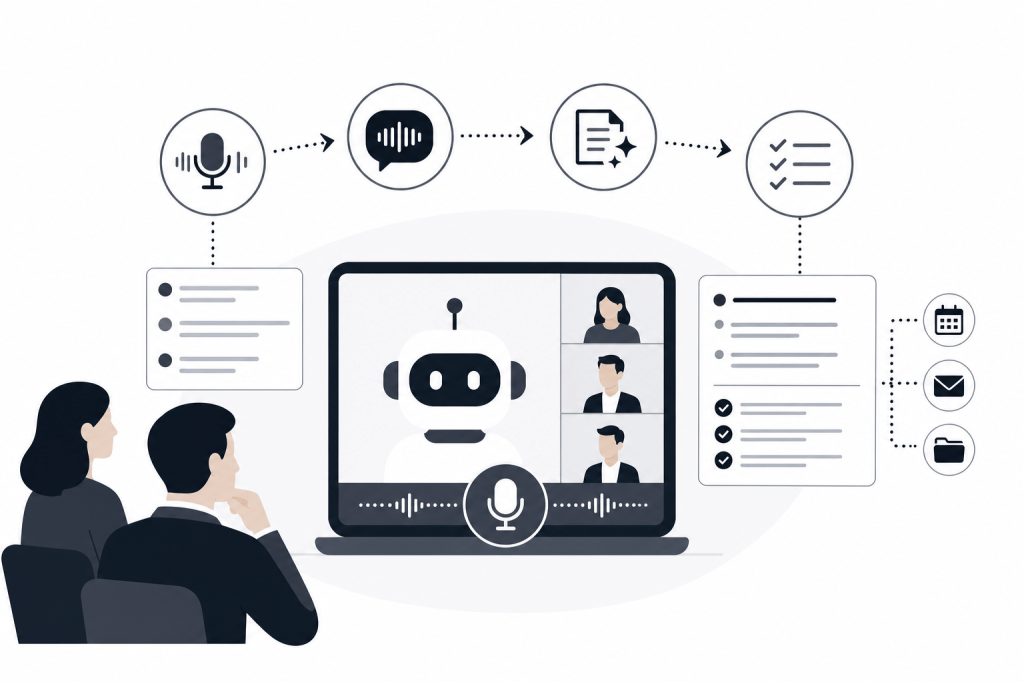
At its core, an AI notetaker does four things in sequence: captures audio, converts speech to text, processes that text for meaning, and outputs something structured and useful.
That sounds simple. The execution is where tools diverge.
Audio Capture
Most AI notetakers join your video call as a bot participant — visible in the attendee panel, recording through the platform's API, processing audio server-side. Some tools take a different approach and record locally from your device's microphone without joining as a visible participant. Each method involves real tradeoffs around consent, accuracy, and privacy, which we'll get into below.
Transcription
Once audio is captured, a speech-to-text model converts it to a written transcript. Accuracy varies by tool, speaker accent, audio quality, and how much domain-specific vocabulary shows up in the conversation. Research published on arxiv.org in its 2025 report found that an AI note-taking system called NoTeeline produced notes with 93.2% factual correctness in a controlled study — a useful benchmark for what well-tuned systems can achieve. That same study found an 8.33% improvement in alignment with individual writing style, which suggests personalization has a real effect on how useful a transcript actually is.
Summarization and Action Items
Transcription is the raw material. The more valuable output is the summary: a condensed version of what was discussed, what was decided, and what needs to happen next. This is where AI models differ most. Some produce generic paragraph summaries. Others identify speakers, tag topics, and extract action items with assignees and deadlines.
The failure mode here is worth naming directly: AI models can hallucinate. A summary might state a commitment that was never made, or attribute a comment to the wrong speaker. This happens more often when audio quality is poor, when people talk over each other, or when the model is inferring intent rather than summarizing stated facts. Treating AI-generated action items as a first draft to review — not a final record — is the right posture.
Delivery and Integration
The last step is getting the output somewhere useful. That might mean a Slack message, an email, a document, or a CRM record. Tools that stop at "here's a transcript in our app" create a new manual step. Tools that push structured data into your existing workflow actually close the loop.
Bot-Based vs. Bot-Free Capture
This distinction matters more than most buyers realize.
Bot-based tools join your meeting as a visible participant. Every attendee can see the recorder in the room. That transparency is good for consent, but some people find it disruptive — and in sensitive meetings like investor calls, executive conversations, or advisory sessions, a bot in the attendee list can subtly change the dynamic.
Bot-free tools record locally from your device without joining as a separate participant. The recording happens silently. That's less conspicuous, but it raises its own questions: are all participants aware they're being recorded? Local recording also depends on your device's microphone rather than the platform's audio stream, which can affect accuracy in noisy environments.
Neither approach is universally better. The right choice depends on your use case, your jurisdiction's consent laws, and the nature of your meetings.
Where Accuracy Actually Breaks Down
Transcript accuracy is the metric most tools lead with, and it genuinely matters. But action-item accuracy is a separate job — and almost no one evaluates it separately.
A tool can produce a 95% accurate transcript and still generate action items that misrepresent what was agreed. The transcript captures what was said. The action items require the model to infer what was meant, who owns it, and by when. Those are harder problems.
When evaluating any AI notetaker, test both independently:
- Read the transcript against the recording for a few calls. Note where it drops words, misidentifies speakers, or garbles domain terms.
- Compare the action items against your own recollection immediately after a call. See whether the model captured actual commitments or invented plausible-sounding ones.
This two-part test takes twenty minutes and tells you more than any vendor benchmark.
Who Actually Needs an AI Notetaker
The honest answer: not everyone, and not every use case benefits equally.
Deal Professionals and Relationship-Driven Teams
If your work is built on relationships — PE and VC deal flow, founder-led sales, boutique advisory — the cost of a missed detail or a dropped follow-up is high. You might have six meetings in a day, each with a different counterpart, each requiring context you pulled from LinkedIn and email history before the call. Writing up notes and syncing them to your CRM after each one is not a small task.
For this profile, an AI notetaker that stops at transcription solves maybe 20% of the problem. The real need is a tool that handles the full workflow: research before the meeting, notes during it, and CRM sync and follow-up drafts after. That's a meaningfully different category from a basic recorder.
High-Volume Sales Teams
Account executives and SDRs running eight to twelve calls a day benefit from automated summaries and CRM logging. The time savings are real and measurable. The tradeoff is that generic summaries don't always capture the nuance a rep needs to write a personalized follow-up. Tools with stronger post-meeting automation close that gap.
Individual Contributors and Knowledge Workers
Researchers, consultants, and project managers who attend a lot of internal meetings often find AI notetakers useful for staying current on decisions made without them. Searchable transcripts across past calls become a knowledge base over time, and the value compounds as the archive grows.
Students and Academics
AI notetakers are increasingly used in lectures and seminars. The use case is real, but there's a risk worth naming: if you know the AI is capturing everything, the incentive to actively process information in the moment decreases. Research on this tradeoff is still early, but it's worth being deliberate about when you rely on automated notes versus when you take them yourself.
What to Look for When Choosing One
Not all AI notetakers are built the same. Here's how to think through the decision:
Transcription quality. Test it on your actual calls, with your industry's vocabulary. Legal, financial, and technical terms trip up generic models more than vendors tend to advertise.
Integration depth. Does the tool push data to where you actually work? A summary that lives only inside the tool's own dashboard creates a new inbox to check. Native integrations with your CRM, email, and Slack matter.
Pre-meeting capability. Most tools are entirely reactive — they start when the meeting starts. A smaller set do research before the meeting, surfacing context about attendees and companies so you walk in prepared. If you're in a relationship-driven role, this is the feature that separates useful from essential.
Post-meeting automation. Does the tool draft your follow-up email? Sync structured notes to your CRM? Build a prospect list from the conversation? These are distinct capabilities, and most tools offer only the first.
Privacy and compliance. Is the tool SOC 2 certified? Where is data stored, and for how long? For financial services professionals, these are not optional questions.
Bot-free option. If you work in sensitive environments, check whether the tool supports local recording without a visible bot participant.
How Baxter Approaches the Full Workflow
Most AI notetakers solve one piece of the meeting workflow. Baxter is built to handle all three stages: what happens before the meeting, during it, and after it.
Before a meeting, Baxter automatically generates a briefing that pulls from 12+ external data sources — including LinkedIn and Crunchbase — alongside internal sources like Gmail and Slack. You get attendee context, recent company news, open items from past conversations, and relationship history, without opening a single tab.
During the meeting, Baxter records and transcribes the call and generates structured notes automatically.
After the meeting, it drafts follow-up emails, builds prospect lists where relevant, and syncs notes, tasks, and tags to HubSpot through a native two-way integration. The agent runs in the background without requiring manual prompts at any stage.
Baxter is available on macOS, Windows, iOS, and Android, is SOC 2 certified, and offers a free plan that includes CRM sync and the Baxter Intel Agent at $0. The Pro plan is $44 per seat per month, and the Business plan is $89 per seat per month for teams of 10 or more, adding unlimited CRM sync and MCP access.
Frequently Asked Questions
What is an AI notetaker?
An AI notetaker is software that records, transcribes, and summarizes meetings automatically. It captures audio, converts speech to text, and produces structured output like summaries and action items. More advanced tools also handle pre-meeting research and post-meeting tasks like CRM sync and follow-up drafts.
How accurate are AI notetakers?
Accuracy varies by tool, audio quality, and vocabulary complexity. Research published on arxiv.org in its 2025 report found that a well-tuned AI note-taking system achieved 93.2% factual correctness in a controlled study. Real-world accuracy depends heavily on your specific use case and how familiar the model is with your industry's terminology.
What is the difference between a bot-based and bot-free AI notetaker?
Bot-based tools join your meeting as a visible participant and record through the platform's API. Bot-free tools record locally from your device without appearing in the attendee list. Bot-based capture is more transparent; bot-free is less disruptive in sensitive meetings but depends on local microphone quality.
Who benefits most from using an AI notetaker?
Deal professionals, sales teams, consultants, and anyone who attends a high volume of meetings benefits most. The ROI is highest when meetings require detailed follow-up, CRM logging, or research-intensive preparation.
Do AI notetakers work for in-person meetings?
Some do. Tools that support local audio capture through a mobile app or desktop microphone can record in-person conversations. Not all tools support this — worth confirming before you buy if in-person capture is part of your workflow.
What privacy risks should I know about?
Key questions: Is all-party consent required in your jurisdiction? Where is the recording stored and for how long? Is the tool SOC 2 certified? For financial services and legal professionals, data residency and retention policies are especially important to verify.
Can an AI notetaker sync directly to my CRM?
Many tools offer some form of CRM integration, but the depth varies considerably. Some push a plain-text summary to a contact record. Others, like Baxter, offer a native two-way sync that writes structured notes, tasks, and tags — and reads existing CRM context to inform meeting prep.
The Bottom Line
An AI notetaker removes the manual work of capturing and organizing what happens in meetings. For most professionals, that's a genuine time saver. For relationship-driven deal professionals, the more important question is whether the tool handles the work on both sides of the meeting — not just the recording in the middle.
If you're evaluating options, start by mapping your actual workflow: what you do in the 30 minutes before a call, during it, and in the hour after. Then find a tool that covers the steps that cost you the most time. The free plan at joinbaxter.com is a reasonable place to test whether the full-workflow approach fits how you work.


Leave a Reply