- Why Manual CRM Entry Keeps Failing
- What AI CRM Automation Actually Does
- The Three Stages Where Data Gets Lost
- How Automation Covers All Three Stages
- What to Look for in an AI CRM Automation Tool
- Why Relationship-Driven Teams Have a Harder Problem
- How the HubSpot Sync Works in Practice
- Setting Up an Automated CRM Workflow
- The Difference Between Note-Taking and CRM Automation
- FAQs
- Stop Logging. Start Reviewing.
Manual CRM data entry is one of those tasks that feels manageable until it isn't. You finish a call, tell yourself you'll log the notes later, and then "later" becomes the end of the week, the end of the month, or never. AI CRM automation exists to close that gap — not by reminding you to do the work, but by doing it for you.
This article covers what AI CRM automation actually looks like in practice, where the copy-paste loop breaks down, and how to build a workflow where your CRM stays current without you touching it after every call.
Why Manual CRM Entry Keeps Failing
The problem isn't discipline. It's timing.
The moment a call ends, you're already thinking about the next one. There's a follow-up email to write, a Slack message waiting, and another meeting in 20 minutes. Logging notes into HubSpot properly — pulling up the contact record, writing out what was discussed, creating a follow-up task, updating the deal stage — takes 15 to 30 minutes when done right. Most people don't have that window.
So the record stays empty. Or someone logs a single line that says "good call, following up" and moves on.
The downstream cost is real. When a deal goes quiet and you want to pick it back up three months later, there's nothing to work from. You're starting fresh with a contact who remembers your last conversation better than your CRM does.
What AI CRM Automation Actually Does
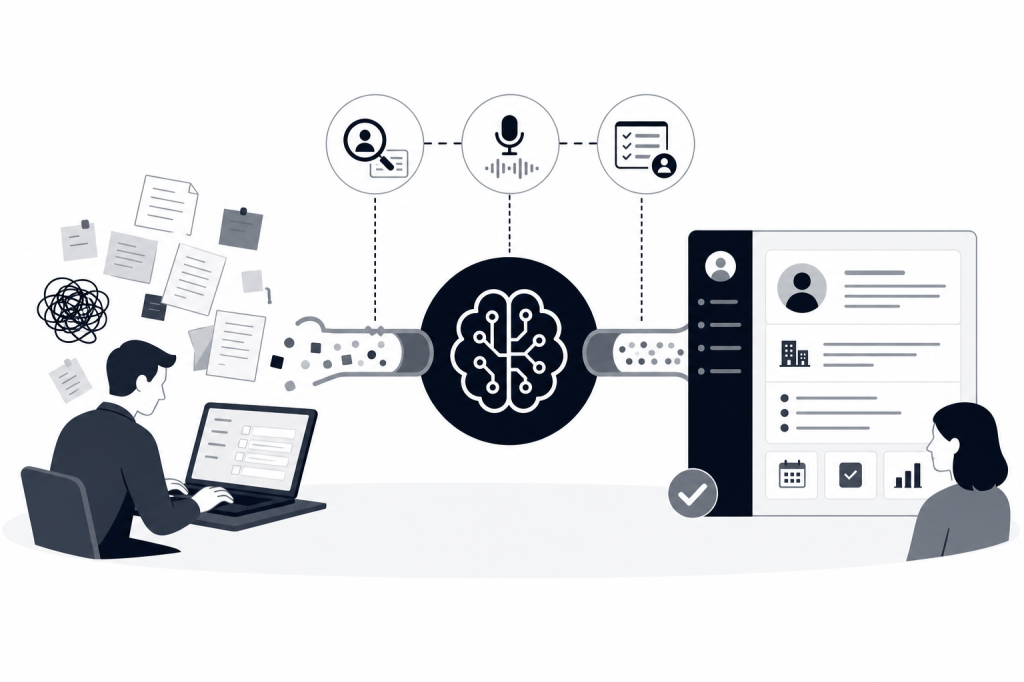
"AI CRM automation" covers a lot of ground depending on the tool. At the shallow end, it means auto-filling a few fields based on email metadata. At the deep end, it means an AI agent that listens to your calls, extracts structured information, and writes it back to your CRM without you lifting a finger.
The meaningful version does at least three things:
Captures what happened. The AI transcribes the call and identifies the key moments — commitments made, objections raised, next steps agreed. It doesn't just produce a wall of text. It organizes the output into something a CRM record can actually hold.
Writes it to the right place. Notes sync to the contact record. Tasks get created for follow-ups. Deal stages update based on what was discussed. And because the sync is two-way, changes in the CRM reflect back in the tool.
Enriches the contact. Good AI CRM automation doesn't just log what you said — it adds context from outside the call. Job title, company size, recent funding, LinkedIn activity. The record gets richer after every interaction, not just more populated with transcripts.
The Three Stages Where Data Gets Lost
Most CRM hygiene problems happen at predictable points. Knowing where the gaps are makes it easier to see what automation actually needs to cover.
Before the Meeting
You open the contact record to prep, and it's thin. The last note is from six months ago. You end up with LinkedIn in one tab, Crunchbase in another, and your email thread in a third. You take mental notes or scribble something on paper. None of it makes it back into the CRM.
Pre-meeting prep is usually invisible to the CRM entirely. You do the research, walk into the call, and the work disappears.
During the Meeting
You're focused on the conversation. You might jot a few things in a notes app or a doc, but you're not logging to HubSpot in real time — and if you try, the act of typing while talking degrades the quality of both.
The gap here is structural. The meeting itself produces the most valuable information in a deal cycle, and it's the moment when capturing it is hardest.
After the Meeting
This is where the copy-paste loop lives. You have notes somewhere — a doc, a voice memo, a half-finished email draft — and the job is to move them into HubSpot in a structured way. It's tedious, it's repetitive, and it's the first thing to get skipped when the day gets busy.
The follow-up email is a separate task on top of that. Then there's the prospect list you meant to build, the task you meant to create, the deal stage you meant to update.
How Automation Covers All Three Stages
A tool that only handles one of these stages solves part of the problem. The CRM still ends up incomplete because the other two stages are still manual.
Baxter is built to run across all three. Before the meeting, it pulls from more than 12 external data sources — including LinkedIn, Crunchbase, and Google — alongside internal sources like Gmail and Slack to generate a briefing automatically. You don't request it. It's ready when you open your calendar.
During the meeting, it records and transcribes the call. The AI agent works in the background without requiring you to prompt it or configure anything mid-call.
After the meeting, notes, tasks, and contact enrichment sync to HubSpot automatically. The native two-way HubSpot integration covers notes, tasks, and tags — so the record is updated before you've even started writing the follow-up. That follow-up draft is generated too, ready to review and send.
The whole loop closes without you re-entering anything.
What to Look for in an AI CRM Automation Tool
Not every tool that claims CRM automation delivers the same depth. Here's what actually matters when you're evaluating options.
Native CRM Integration vs. Zapier Workarounds
Some tools sync to your CRM through a third-party automation layer. That works until it doesn't — and when it breaks, you don't always know until the data is already missing. Native two-way sync is more reliable and handles structured data like tasks, tags, and deal stages rather than just dumping a transcript into a notes field.
Zero-Prompt Operation
If you have to remember to start the recording, trigger the sync, or ask the AI to generate the summary, you've reintroduced a manual step. The value of automation is that it runs whether or not you remembered to activate it. Look for tools where the AI agent operates in the background by default.
External Data Enrichment
A CRM record that only contains what you typed is still a thin record. The most useful records combine what happened in the meeting with what's true about the contact and company outside of it — which means pulling from LinkedIn, Crunchbase, and similar sources, not just your own email history.
Post-Meeting Outreach Automation
Logging notes is one thing. Drafting the follow-up email, generating a prospect list from the conversation, and creating tasks for next steps is another layer entirely. Most note-taking tools stop at the transcript. The more complete tools handle the outreach side too.
Why Relationship-Driven Teams Have a Harder Problem
For high-volume sales teams running a structured pipeline, CRM hygiene is a process problem. You can address it with training, templates, and manager review.
For deal professionals at PE and VC firms, boutique advisory practices, and founder-led sales teams, the problem is different. The relationships are fewer, deeper, and longer-lived. A single contact might be in your CRM for five years across three different contexts. The cost of a thin record isn't a missed follow-up — it's walking into a conversation without the context that would have made it meaningful.
These teams also don't have a research analyst to pull background before every call. The prep work falls on the person running the meeting, competing directly with everything else on their plate.
That's the specific gap Baxter was built for. The AI operating system for relationship-driven firms handles the research, the logging, and the outreach so the professional can focus on the relationship itself.
How the HubSpot Sync Works in Practice
HubSpot is the most common CRM in this segment, and the quality of the integration matters more than the mere fact of it.
Baxter's native two-way HubSpot sync means changes flow in both directions. Notes from a call appear on the contact record in HubSpot automatically. Tasks created by the AI agent show up in HubSpot's task view. Tags applied in Baxter carry over. Update something in HubSpot, and it reflects back.
This is different from a one-way push where the tool writes to HubSpot but doesn't read from it. One-way integrations create drift — the CRM and the tool end up with different versions of the same record.
The sync runs without manual input after every call. No exporting, no copying, no triggering anything. The record is current by the time you're ready to write the follow-up.
Setting Up an Automated CRM Workflow
If you're starting from scratch or replacing a manual process, the setup is simpler than it sounds.
Connect your calendar, email, and HubSpot to the tool. That's the core data layer — the calendar tells the AI what meetings are coming, email provides relationship history, and HubSpot is where the output lands.
From there, the workflow runs on its own. Pre-meeting briefings appear before each call. Recording and transcription happen during the call. Notes and tasks sync to HubSpot after. Follow-up drafts are ready to review.
The only thing left to do is review and send — not write from scratch.
Baxter is available on macOS, Windows, iOS, and Android, so the workflow follows you whether you're at a desk or between meetings. The free plan at $0 includes pre-meeting intelligence, CRM sync, and the Baxter Intel Agent — a reasonable starting point for testing whether the workflow fits. The Pro plan at $44/seat/month adds unlimited transcription and notes. The Business plan at $89/seat/month for teams of 10 or more adds unlimited CRM sync and MCP access.
The Difference Between Note-Taking and CRM Automation
This distinction matters because a lot of tools market themselves as CRM automation when they're really note-takers with an export button.
A note-taking tool records what happened and lets you read it back. A CRM automation tool takes what happened and writes it into your CRM in a structured, usable form — without you doing the translation.
Fathom, for example, has a strong free plan and handles recording well. Its Business tier at $25/user/month adds CRM field sync, which is useful. But it doesn't do pre-meeting research, doesn't pull from LinkedIn or Crunchbase, and doesn't draft outreach. You get the transcript; the rest is still on you.
Fireflies.ai has deep HubSpot integration and good searchability across past calls. But it's passive before the meeting — no contact research, no external enrichment, no autonomous outreach drafting.
The gap is the full loop. Most tools cover one stage. Covering all three — before, during, and after — is what actually stops the copy-paste cycle.
FAQs
What is AI CRM automation?
AI CRM automation refers to software that captures information from calls, emails, and meetings and writes it into your CRM automatically, without requiring manual data entry. The most complete versions also enrich contact records from external sources and generate follow-up drafts after each interaction.
Does AI CRM automation work with HubSpot?
Yes, though the quality of the integration varies by tool. Baxter offers a native two-way HubSpot sync that covers notes, tasks, and tags, meaning data flows in both directions without manual export or import steps.
What's the difference between a note-taking app and a CRM automation tool?
A note-taking app captures what was said and lets you read it back. A CRM automation tool takes that information and writes it into your CRM in a structured form — updating contact records, creating tasks, and syncing deal data — without you doing the translation manually.
Do I need to manually start the recording or trigger the sync?
With Baxter, no. The AI agent operates in the background without requiring manual prompts. Pre-meeting briefings, recording, transcription, and CRM sync all run automatically based on your calendar and connected accounts.
What external data sources does AI CRM automation pull from?
This depends on the tool. Baxter pulls from more than 12 external sources including LinkedIn, Crunchbase, and Google, alongside internal sources like Gmail, Google Calendar, and Slack. Most note-taking competitors don't pull external data at all.
Is AI CRM automation secure enough for deal-sensitive information?
Security standards vary. Baxter is SOC 2 certified, which is the standard audit framework for SaaS data security. All plans include SOC 2 security and email support.
How long does it take to set up an automated CRM workflow?
The core setup — connecting your calendar, email, and HubSpot — takes a few minutes. Once connected, the workflow runs automatically. There's no ongoing configuration required for the standard pre-meeting, during-meeting, and post-meeting automation.
Stop Logging. Start Reviewing.
The goal of AI CRM automation isn't to make data entry faster. It's to remove it from your workflow entirely. When your CRM updates itself after every call, the question shifts from "did I log that?" to "what do I do with this information?"
That's the shift that actually changes how deal professionals work. Less time reconstructing what happened, more time acting on it.
If your HubSpot records are emptier than they should be, or your post-call routine is eating an hour you don't have, the workflow described here is worth testing. Start at joinbaxter.com to see how the full loop works in practice.


Leave a Reply