- Why Most Sales Call Software Stops Short
- The Three Stages Every Sales Call Tool Should Cover
- What "Agentic" Actually Means in This Context
- CRM Sync: The Feature That Separates Useful from Essential
- Evaluating Sales Call Software: A Practical Framework
- The Full-Loop Standard
- Frequently Asked Questions
Most sales call software does one thing well and leaves the rest to you. It records the call. Maybe it transcribes it. Then it sits there, waiting for you to do something with the output. If you've ever finished a call, stared at a wall of AI-generated notes, and still spent 45 minutes writing a follow-up and updating your CRM, you've felt the gap between what good sales call software promises and what great sales call software actually delivers.
This article breaks down what that gap looks like in practice, which features actually move the needle, and how to evaluate tools against the full meeting workflow — not just the recording itself.
Why Most Sales Call Software Stops Short
The category has matured quickly. Recording and transcription are table stakes now. Nearly every tool handles them. But the problems that cost deal professionals the most time aren't solved by a transcript.
The real friction points are:
- Walking into a call underprepared. You have five minutes before the meeting and no time to pull LinkedIn, check Crunchbase, or scan your email history with this person.
- Leaving a call with notes you'll never use. A 40-minute transcript is not an action plan. Someone still has to synthesize it, log it, and decide what happens next.
- The post-call hour. Writing follow-ups, updating CRM records, and drafting outreach often takes longer than the call itself. For relationship-driven professionals handling 8 to 12 meetings a week, that adds up fast.
Software that only addresses the middle of this loop — the call itself — leaves the before and after entirely to you. That's the core distinction between good and great.
The Three Stages Every Sales Call Tool Should Cover
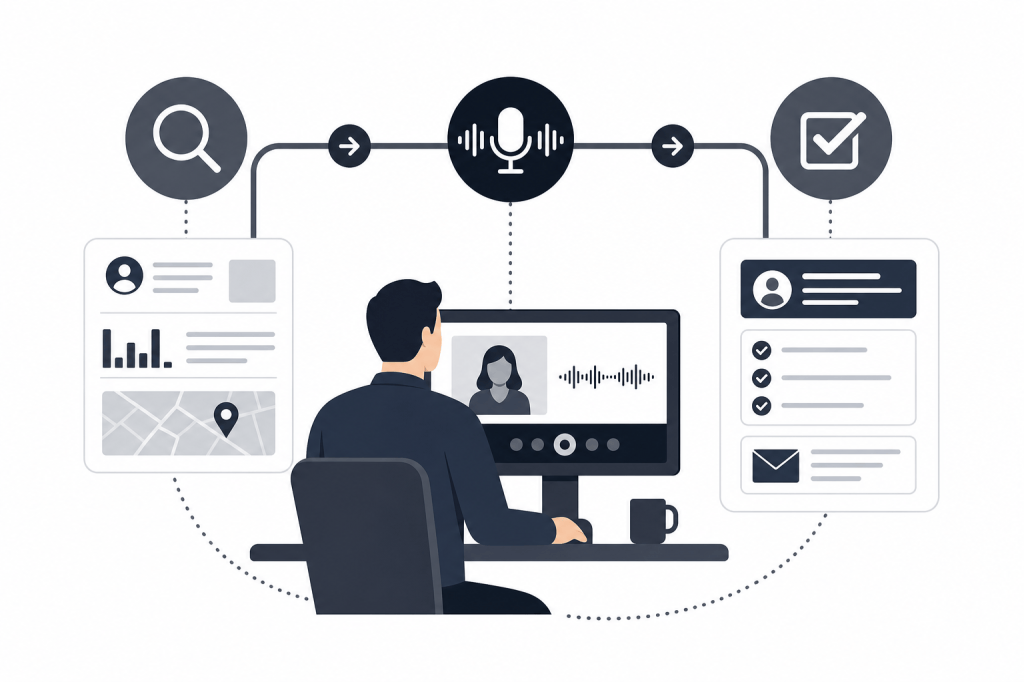
When evaluating sales call software, think in three stages: before the call, during the call, and after the call. Most tools cover one of these well. The best cover all three without requiring you to manually trigger anything.
Before the Call: Pre-Meeting Intelligence
Pre-meeting research is where deals are won or lost before a word is spoken. Walking in with context on a prospect's recent funding round, their LinkedIn activity, or an open item from your last conversation signals professionalism and builds trust. Walking in cold signals the opposite.
Great sales call software automates this. It pulls from external sources like LinkedIn and Crunchbase, cross-references your email history and CRM, and surfaces a briefing before the meeting starts — without you having to ask for it.
This is the feature most tools skip entirely. Fathom, for example, is a capable recording tool at $25/user/month on its Business tier, but it has no pre-meeting research layer. Fireflies Pro (roughly $10 to $18/user/month) integrates with HubSpot but doesn't proactively brief you before a call. Avoma's Business plan at $49/user/month covers scheduling and coaching well, but it's built for high-volume SaaS pipelines — not the relationship-depth context that PE, VC, or advisory professionals depend on.
If your work lives and dies on relationship context, the absence of a pre-meeting intelligence layer is a meaningful gap.
During the Call: Recording, Transcription, and Live Notes
This is where the category is most crowded and most mature. Automatic recording, real-time transcription, and AI-generated notes are available across nearly every platform at most price points.
What separates good from great here isn't whether a tool can transcribe — it's whether the notes it generates are actually structured for action. A transcript is raw material. A useful summary identifies key topics, action items, and follow-up commitments without you having to manually highlight them.
Reliability matters too. In-person meetings, phone calls, and hybrid setups each require different capture methods. Software that only works with video conferencing bots will leave gaps in your coverage. Look for tools that handle in-person recording and mobile capture, not just Zoom and Google Meet.
After the Call: Automation That Actually Closes the Loop
This is where the biggest productivity gap lives, and where most tools disappoint the most.
Logging notes to your CRM after every call feels manageable — until you're doing it at 7pm after your sixth meeting of the day. Most sales professionals know the CRM hygiene problem well: records go stale, context gets lost, and the next person who touches that contact has no idea what happened.
Great sales call software doesn't just offer a "sync to CRM" button. It syncs automatically, without a manual trigger. It drafts follow-up emails based on what was discussed. It identifies next steps and creates tasks. For relationship-driven professionals, it might also build prospect lists or draft outbound communications based on context from the call.
That's a fundamentally different capability than pushing a transcript to a CRM field.
What “Agentic” Actually Means in This Context
The word "agentic" gets used loosely in AI software marketing. In the context of sales call tools, it has a specific meaning worth understanding.
A reactive tool waits for you to do something. You finish a call, open the app, click "generate summary," copy the output to your CRM. The tool is useful, but it's a manual workflow with an AI layer on top.
An agentic tool runs in the background across the full workflow without waiting for prompts. It pulls the briefing before the meeting. It records and transcribes during. It drafts the follow-up, syncs the notes, and logs the tasks after. You don't initiate any of these steps.
For a Partner at a PE firm running eight calls a week, the difference between reactive and agentic is roughly three to four hours of admin per week — time that goes back to sourcing, relationship building, or portfolio work.
Baxter is built specifically around this model. It connects to your calendar, email, and HubSpot, then handles the full meeting loop automatically: pre-meeting briefings drawn from 12+ external sources including LinkedIn and Crunchbase, live transcription and note generation, and post-meeting automation that drafts follow-ups, builds prospect lists, and syncs everything to HubSpot two-way — without manual input. The AI agent runs in the background across all three stages without requiring a prompt.
CRM Sync: The Feature That Separates Useful from Essential
If your CRM is empty, your sales call software isn't doing its job.
CRM hygiene is one of the most persistent problems in deal-driven organizations. Notes don't get logged. Tasks don't get created. The follow-up email gets written but the CRM record stays blank. Six months later, you're reconstructing the history of a relationship from memory and scattered emails.
The right sales call software eliminates this by making CRM sync automatic and bidirectional — not a one-way push of raw notes, but a structured sync of notes, tasks, and tags that keeps your CRM current without any manual work.
For teams using HubSpot, this is worth evaluating carefully. Some tools offer HubSpot integration in name only, pushing a transcript blob to a contact record. Others offer field-level sync that maps structured data from the call to the right places in HubSpot. The difference matters enormously for pipeline visibility and reporting.
Baxter's native two-way HubSpot sync covers notes, tasks, and tags. It's included on the free plan, with unlimited CRM sync available on the Business plan at $89/seat/month for teams of 10 or more.
Evaluating Sales Call Software: A Practical Framework
When comparing tools, these are the questions that matter most:
Does it work before the meeting starts?
Pre-meeting briefings are the feature that separates tools built for relationship professionals from tools built for generic sales teams. If the software only activates when you join a call, it's solving the easier half of the problem.
Does it require manual prompts to do useful things?
Every step that requires your attention is a step that will sometimes get skipped. The best tools run automatically. If you have to remember to click "generate summary" or "sync to CRM," you eventually will forget — and that's when the CRM hygiene problem starts.
How deep is the external data enrichment?
Knowing a contact's job title is not intelligence. Understanding their recent activity, their company's funding history, and the context of your last three interactions is intelligence. Look for tools that pull from multiple external sources, not just your existing CRM records.
What does post-meeting automation actually cover?
There's a real difference between "we push notes to your CRM" and "we draft your follow-up email, create tasks, and build a prospect list based on what was discussed." Understand exactly what's automated and what still requires your input.
Does it fit your vertical?
Tools built for high-volume SaaS pipelines are optimized for different workflows than tools built for relationship-driven professionals in PE, VC, or advisory. The feature set, the briefing depth, and the CRM integration priorities are different. Make sure the tool you're evaluating was designed for the kind of work you actually do.
The Full-Loop Standard
The best way to evaluate sales call software in 2026 is to hold it to a full-loop standard. Does it make you better prepared before the call? Does it handle the call itself without friction? Does it close out the post-call work automatically?
Most tools pass one of those tests. Some pass two. Very few pass all three without requiring manual intervention at each stage.
For deal professionals who personally carry key relationships, the full-loop standard isn't a nice-to-have. Every meeting where you walk in underprepared is a missed opportunity to build trust. Every CRM record that goes unlogged is a gap in your institutional knowledge. Every follow-up that takes 45 minutes to write is time you're not spending on the next relationship.
Sales call software that covers only the recording is good. Software that covers the full loop autonomously is great. The gap between them is where most of your post-meeting time currently goes.
Frequently Asked Questions
What is sales call software?
Sales call software records, transcribes, and analyzes sales calls. More advanced tools also automate pre-meeting research, post-meeting CRM updates, and follow-up drafting.
What's the difference between a reactive and an agentic sales call tool?
A reactive tool waits for you to trigger actions like generating a summary or syncing to your CRM. An agentic tool runs automatically across the full meeting workflow — handling briefings, transcription, and post-call tasks without manual prompts.
Do sales call tools integrate with HubSpot?
Many tools offer some form of HubSpot integration, but the depth varies significantly. Some push raw transcripts to contact records. Others, like Baxter, offer native two-way sync covering notes, tasks, and tags — keeping HubSpot current automatically.
What should I look for in pre-meeting briefing features?
Look for tools that pull from multiple external data sources (LinkedIn, Crunchbase, news) as well as your internal email and CRM history. The briefing should surface automatically before the meeting, not require you to request it.
Is sales call software useful for PE and VC professionals, or is it mainly for SaaS sales teams?
Most tools in the category are built for high-volume SaaS pipelines. Tools like Baxter are designed specifically for relationship-driven professionals in PE, VC, wealth management, and advisory — where briefing depth and CRM hygiene matter more than call volume metrics.
How does post-meeting automation work in the best sales call tools?
In the most capable tools, post-meeting automation drafts follow-up emails based on call content, creates CRM tasks, syncs structured notes to the relevant contact and deal records, and can build prospect lists or outreach drafts — all without manual input.
What's a reasonable budget for sales call software in 2026?
Pricing ranges from free (with limited features) to $89/seat/month or more for full-featured team plans. Baxter's Pro plan is $44/seat/month and includes unlimited transcription, unlimited in-person capture, and unlimited Ask Baxter. The Business plan is $89/seat/month for teams of 10 or more and adds unlimited CRM sync and storage.
The standard for sales call software has moved well past recording and transcription. If your current tool doesn't brief you before the call and close out the admin after it, you're still doing most of the work yourself. That's the gap worth closing.


Leave a Reply