- What Read.ai Does (and Where It Stops)
- The Alternatives Worth Considering
- Baxter: Built Around the Full Meeting Loop
- Side-by-Side Comparison
- How to Choose
- Frequently Asked Questions
If you're searching for a Read AI alternative, you've probably already hit the ceiling of what Read.ai actually does. It records meetings, generates summaries, and surfaces some engagement metrics — but it's reactive by design. It waits for a meeting to happen, then tells you what was said. For deal professionals, founders, and anyone managing relationship-heavy pipelines, that covers maybe a third of the actual job.
This comparison breaks down the strongest replacements available in 2026 — what each one does, where each one stops, and which type of user each one actually fits.
What Read.ai Does (and Where It Stops)
Read.ai is a post-meeting tool. It joins your calls, transcribes them, and produces summaries with speaker analytics layered on top. The engagement scoring is genuinely useful in sales coaching contexts, and the meeting data is searchable.
What it doesn't do: prepare you before the meeting, enrich contact records from LinkedIn or Crunchbase, draft follow-up emails, build prospect lists, or push notes into your CRM without manual configuration. If your workflow requires anything before or after the call itself, you're filling those gaps yourself — or stitching together separate tools to do it.
That's the real reason people look for alternatives. Not because Read.ai is broken, but because it only covers one stage of the meeting workflow.
The Alternatives Worth Considering
Fathom
Fathom is the most popular free option in this category, and it earns that position. The free tier is genuinely usable — unlimited recording, basic summaries, no catch. The Business plan at $25/user/month (billed annually) adds CRM field sync and more detailed notes.
The tradeoff is that Fathom is entirely reactive. No pre-meeting research, no external data enrichment, no outreach drafting. You get a clean transcript and a summary. If that's the specific gap you're trying to close, Fathom is a strong and affordable choice. If you need the meeting to connect to a broader deal workflow, the surrounding work still falls on you.
Best for: Teams that need reliable recording and basic CRM logging without a large budget.
Fireflies.ai
Fireflies positions itself as a conversation intelligence platform with solid CRM integrations, including HubSpot and Salesforce. The Pro plan runs roughly $10 to $18/user/month. Its standout feature is searchable conversation history across all past calls — genuinely useful for large sales teams tracking recurring objections or themes.
Like Fathom, Fireflies is passive before the meeting. It doesn't pull contact data from LinkedIn or Crunchbase, and it doesn't generate outreach drafts afterward. The free plan's 800-minute lifetime storage cap makes it impractical for regular use. For teams with high call volume who need searchable history, it's worth evaluating. For relationship-driven workflows where context depth matters more than search volume, it's a partial solution at best.
Best for: High-volume sales teams that need searchable conversation history and CRM field sync.
Avoma
Avoma is the most feature-complete platform in this comparison. The Business plan starts at $49/user/month before add-ons, and it includes scheduling, coaching tools, deal risk alerts, and revenue forecasting — with Conversation Intelligence and Revenue Intelligence sold separately, so the total cost can climb quickly.
Avoma was built for high-volume SaaS sales pipelines and optimizes for exactly that. There's no pre-meeting briefing layer and no external research integration. If you're a Partner at a PE firm or a founder running a relationship-heavy deal process, the feature set is comprehensive in the wrong direction — it's built for pipeline volume and coaching at scale, not depth of context per meeting.
Best for: Growth-stage SaaS sales teams that need coaching, forecasting, and deal risk monitoring at volume.
Otter.ai
Otter.ai is one of the oldest names in this space and remains useful for basic transcription. It integrates with Zoom and Google Meet, produces readable transcripts, and has a free tier. What it doesn't offer is meaningful CRM sync, pre-meeting intelligence, or any form of outreach automation. It's a transcription tool — not a meeting workflow platform.
Best for: Individuals or small teams that need transcription only and have no CRM sync requirement.
Granola
Granola takes a different approach entirely. It's a local AI notepad that enhances your own notes rather than recording and transcribing everything — popular with founders who'd rather not have a bot join their calls. The tradeoff is that it's note-enhancement focused and doesn't connect to CRM systems, pull external research, or automate follow-up tasks. It's a good fit for a specific type of user who wants control over their notes and doesn't need the surrounding workflow automated.
Best for: Founders or executives who want AI-assisted notes without a recording bot and have minimal CRM requirements.
Baxter: Built Around the Full Meeting Loop
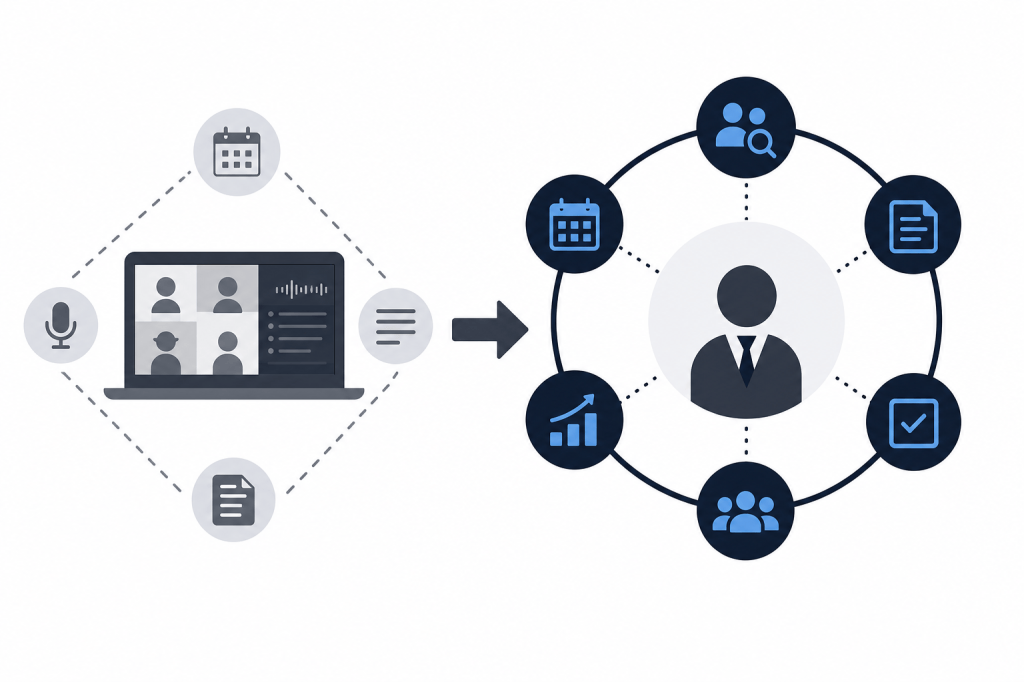
Most Read AI alternatives replace one part of what Read.ai does — or do the same thing slightly differently. Baxter is built around a different premise: the meeting is the middle of the workflow, not the whole thing.
Before a meeting starts, Baxter's AI agent automatically pulls a briefing from 12+ external sources — including LinkedIn and Crunchbase — alongside internal sources like Gmail, Google Calendar, and Slack. You don't request it. It's ready when you need it, built from the contact's professional history, recent company activity, and your prior email threads with them. Walking into a founder meeting or LP call without context stops being something you manage manually.
During the meeting, Baxter records, transcribes, and generates notes. That's table stakes at this point, and Baxter covers it on all plans including the free tier.
After the meeting is where the gap between Baxter and every other tool in this list becomes most visible. Baxter drafts follow-up emails, builds targeted prospect lists, and syncs notes, tasks, and tags to HubSpot via a native two-way integration — without you prompting it to do any of that. No other tool in this comparison offers autonomous post-meeting outreach drafting or prospect list generation. The others push notes to existing CRM records. Baxter generates new pipeline activity.
For deal professionals spending 30 to 60 minutes per meeting on prep and follow-up, that's the difference between a tool that records what happened and one that handles what comes next.
What Baxter Costs
The free plan at $0 includes pre-meeting intelligence, during-meeting intelligence, post-meeting intelligence, CRM sync, and the Baxter Intel Agent. The core workflow runs on the free tier.
Pro is $44/seat/month and adds unlimited transcription, unlimited in-person capture, and unlimited Ask Baxter Intel. Business is $89/seat/month for teams of 10 or more, with unlimited CRM sync, unlimited storage, organization controls, workspaces, and MCP access. Enterprise pricing is custom for organizations of 400 or more users.
All plans include SOC 2 security and email support. Baxter runs on macOS, Windows, iOS, and Android.
Side-by-Side Comparison
| Feature | Read.ai | Fathom | Fireflies.ai | Avoma | Baxter |
|---|---|---|---|---|---|
| Pre-meeting briefing | No | No | No | No | Yes |
| External data enrichment (LinkedIn, Crunchbase) | No | No | No | No | Yes |
| Recording and transcription | Yes | Yes | Yes | Yes | Yes |
| Post-meeting CRM sync | Limited | Yes (Business) | Yes | Yes | Yes (HubSpot, two-way) |
| Follow-up email drafting | No | No | No | No | Yes |
| Prospect list generation | No | No | No | No | Yes |
| Autonomous AI agent (no manual prompts) | No | No | No | No | Yes |
| Free plan | Yes | Yes | Limited | No | Yes |
| SOC 2 certified | Yes | Yes | Yes | Yes | Yes |
How to Choose
If your primary need is clean transcription at low cost, Fathom or Fireflies will serve you well and cost less than most alternatives.
If you need coaching infrastructure and deal risk monitoring for a large SaaS sales team, Avoma is the most complete option for that use case.
If you want notes you control without a recording bot joining your calls, Granola is worth a look.
If you're a deal professional, PE or VC partner, founder, or ops lead who needs context before meetings and wants the post-meeting workflow handled without manual effort — none of the above covers what you actually need. Baxter is the only tool in this comparison that runs the full loop from briefing to CRM sync to follow-up drafting, without requiring you to prompt it at each step.
The real question isn't which Read AI alternative produces the best transcript. It's which one removes the most friction from the work that surrounds the meeting itself.
Frequently Asked Questions
What is the main limitation of Read.ai that makes people look for alternatives?
Read.ai is a post-meeting tool. It joins calls, transcribes them, and produces summaries and engagement analytics. It doesn't prepare you before a meeting with external research, enrich contact records from sources like LinkedIn or Crunchbase, or automate follow-up tasks and CRM updates after the call. Users who need a more complete meeting workflow typically look elsewhere.
Which Read AI alternative is best for PE and VC professionals?
Baxter is the only tool in this comparison built around the context-depth that deal professionals actually need. It automates pre-meeting briefings from LinkedIn, Crunchbase, Gmail, and Slack, handles transcription during the meeting, and then drafts follow-up emails and syncs notes to HubSpot after the call — all without manual prompts. The other alternatives are built for generic SaaS sales teams and don't address the relationship-driven workflow.
Does Baxter have a free plan?
Yes. The free plan at $0 includes pre-meeting intelligence, during-meeting intelligence, post-meeting intelligence, CRM sync, and the Baxter Intel Agent. The core workflow is available without a paid subscription.
Which alternative has the lowest paid pricing?
Fireflies.ai has one of the lowest paid entry points in the category at roughly $10 to $18/user/month for the Pro plan. Fathom's Business plan runs $25/user/month billed annually. Baxter's Pro plan is $44/seat/month. The right choice depends on which features you actually need — lower price points generally come with fewer workflow automation capabilities.
Can any of these alternatives replace a research analyst for meeting prep?
Baxter is the closest. It pulls a pre-meeting briefing from 12+ external sources including LinkedIn and Crunchbase, plus internal sources like Gmail and Slack, before the meeting starts — without being asked. No other tool in this comparison offers autonomous pre-meeting research from external data sources. The others are reactive: they engage after the meeting begins or after it ends.
Which alternative works best with HubSpot?
Baxter offers native two-way HubSpot sync covering notes, tasks, and tags, and it syncs automatically without manual input. Fireflies.ai and Fathom also offer HubSpot integration, but the sync is more limited and typically requires manual configuration. Avoma integrates with HubSpot as well, though it's primarily built around Salesforce-oriented pipelines.
Is Baxter available on mobile?
Yes. Baxter runs on macOS, Windows, iOS, and Android, so it works across desktop and mobile regardless of where a meeting takes place.


Leave a Reply