- Why Admin Work Keeps Expanding
- The Categories That Matter Most
- What a Fully Automated Meeting Workflow Looks Like
- How to Evaluate Sales Productivity Tools
- The Tools Worth Knowing About
- Building a Stack That Actually Reduces Admin
- FAQs
- Start With the Meeting Loop
If you're spending 30 to 60 minutes on prep and follow-up for every meeting, the problem isn't your work ethic — it's your tools. The right stack handles research, note-taking, CRM updates, and follow-up drafts automatically, so you walk into every call prepared and leave with nothing left on your plate.
This article covers the tool categories that actually reduce admin work, what to look for in each, and how to build a stack that fits a relationship-driven workflow rather than a high-volume SDR motion.
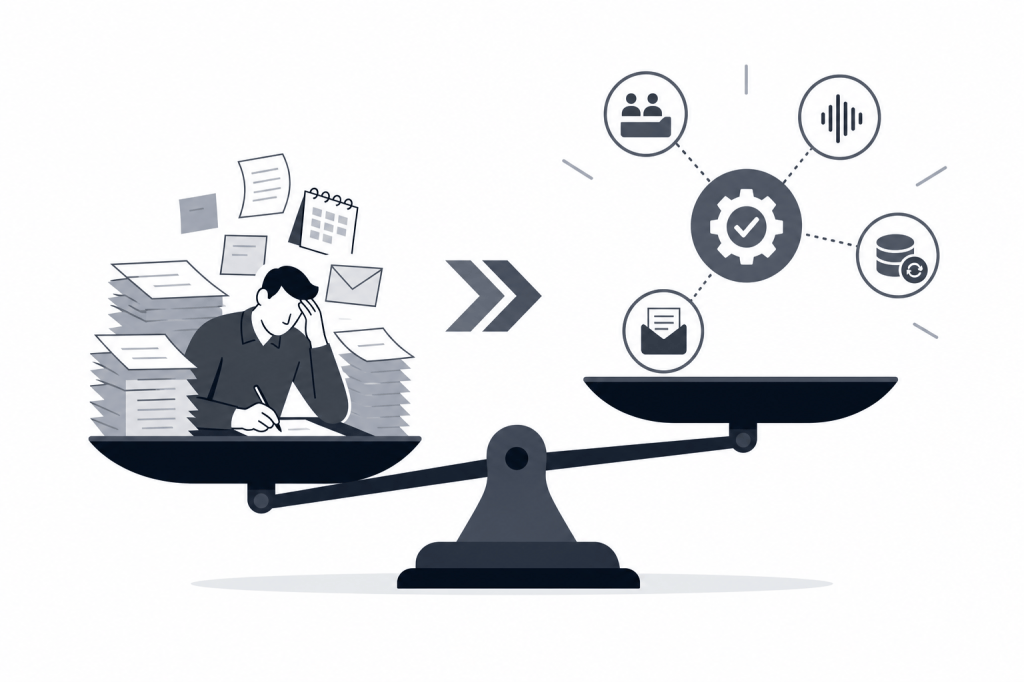
Why Admin Work Keeps Expanding
Sales admin doesn't feel like a problem until it's eating your afternoons. The pattern is familiar: you block 20 minutes before a call to pull together LinkedIn context and email history, the meeting runs long, and then you spend the next hour writing a follow-up and manually logging notes into your CRM.
Multiply that by 5 to 10 meetings a week and you're losing a full workday to tasks that don't require your judgment.
The tools that actually solve this aren't the ones that make manual tasks slightly faster. They're the ones that remove the manual task entirely — automating research, transcription, CRM sync, and outreach drafting in the background, without waiting for you to prompt them.
The Categories That Matter Most
Not every tool category reduces admin equally. Some just move the work around. These are the ones that genuinely cut it.
Meeting Intelligence and Preparation
Most sales professionals walk into meetings having done one of two things: nothing, or a rushed 10-minute LinkedIn scan. Neither is good enough when the person across the table has done their homework.
Meeting intelligence tools solve this by pulling contact and company data automatically before a call starts. The best ones don't just surface a LinkedIn profile — they synthesize news, funding history, mutual connections, email thread context, and prior meeting notes into a briefing you can read in two minutes.
What separates useful tools from noise here is whether they work proactively. A tool that requires you to open it and search a contact's name hasn't actually saved you time. One that detects an upcoming calendar event and sends you a briefing before you ask — that's where the real savings come from.
Transcription and Live Capture
Recording and transcribing meetings used to be a nice-to-have. In 2026, it's table stakes. The value isn't just the transcript — it's everything downstream that becomes possible when you have an accurate, searchable record of what was said.
When evaluating transcription tools, a few questions are worth asking: Does it work for in-person meetings, not just video calls? Can it distinguish speakers reliably? Does it integrate with your CRM so notes don't have to be copied manually?
CRM Sync and Data Hygiene
Empty CRM records are one of the most common and expensive problems in relationship-driven sales. Notes get taken in a meeting, never logged, and six months later nobody remembers what was discussed or where the deal stood.
Automatic CRM sync tools address this by pushing meeting notes, tasks, and contact updates directly into your CRM after every call. Two-way sync is better than one-way — changes made in your CRM flow back to the tool as well, so you're always working from a single source of truth.
If your team runs on HubSpot, look for native integration rather than Zapier-based workarounds. Native integrations sync notes, tasks, and tags reliably without breaking when an API changes.
Post-Meeting Follow-Up Automation
The hour after a call is where most admin time goes. You're writing a follow-up email, summarizing next steps, updating deal stages, and creating tasks for yourself. All of that can be automated if your meeting intelligence tool has access to the transcript and the context of the relationship.
Tools that draft follow-up emails automatically — based on what was actually said, not a generic template — save 20 to 40 minutes per call. Over a full week of meetings, that's hours returned to pipeline work.
What a Fully Automated Meeting Workflow Looks Like
When the right tools are in place, the workflow changes significantly.
Before the meeting: Your tool detects a calendar event and automatically generates a briefing — the contact's LinkedIn activity, company news, funding history from Crunchbase, and your prior email thread — without you opening a browser.
During the meeting: The call is recorded and transcribed in real time. Speaker identification works cleanly. You're present in the conversation instead of taking notes.
After the meeting: The tool drafts a follow-up email based on the transcript, creates tasks for any commitments made, and syncs everything to your CRM. You review, edit if needed, and send. Total time: five minutes instead of fifty.
This isn't a hypothetical. It's what tools like Baxter are built to deliver — an AI agent that operates across the full meeting loop without requiring manual prompts at each step.
How to Evaluate Sales Productivity Tools
The market is crowded, and most tools solve one part of the problem well while leaving the rest to you. Here's a framework for cutting through it.
Does it work before the meeting, not just after?
Most meeting tools are reactive. They record, transcribe, and push notes to your CRM — but only after the meeting has already happened. That's useful, but it doesn't solve the prep problem. If a tool doesn't generate pre-meeting briefings automatically, you're still doing research manually.
Is it agentic or does it require prompts?
There's a meaningful difference between a tool that waits for you to ask it something and one that acts in the background without being prompted. For busy deal professionals, the latter is the only kind that reliably reduces admin. If you have to remember to open the tool, you'll eventually stop using it.
How deep is the CRM integration?
"CRM integration" can mean anything from a basic Zapier zap to a native two-way sync that handles notes, tasks, tags, and deal stage updates. Ask specifically: Does it push notes to HubSpot automatically? Does it sync tasks? Is it two-way? What happens if a sync fails?
Does it cover in-person meetings?
Video-only tools miss a significant portion of relationship-driven sales activity. If you're doing in-person LP meetings, client dinners, or calls from your phone, you need a tool that captures those too.
What’s the data sourcing depth?
For pre-meeting research, the quality of the briefing depends entirely on where the data comes from. A tool pulling from one or two sources gives you a shallow profile. One pulling from LinkedIn, Crunchbase, Google, your email history, your Slack threads, and your CRM gives you something you can actually use.
The Tools Worth Knowing About
Lightweight Note-Takers
Fathom ($0 to $25/seat/month) is one of the most widely used free meeting recorders, and its core advantage is unlimited free recording. It's entirely reactive, though — no pre-meeting briefing, no external data enrichment, no outreach drafting. CRM field sync is only available on the paid Business tier.
Fireflies.ai ($10 to $18/seat/month) offers strong CRM integration and searchable conversation history. Like Fathom, it's passive before the meeting — no contact research, no external data sourcing. The free plan caps at 800 minutes of lifetime storage, which makes it impractical for regular use.
Otter.ai is primarily a transcription tool with minimal CRM automation and no relationship intelligence layer.
These tools are useful if your only goal is transcription. They don't address prep or post-meeting outreach.
Conversation and Revenue Intelligence Platforms
Avoma ($0 to $49/seat/month, with add-ons) is the most feature-complete platform in the note-taker category — scheduling, coaching, deal risk alerts, forecasting, and win-loss analysis included. It doesn't have a pre-meeting briefing layer or external research capability, and it's built for high-volume SaaS sales teams rather than the relationship-depth motions common in PE or wealth management.
Read.ai is primarily post-meeting and reactive. It doesn't offer autonomous outreach drafting or external enrichment at depth.
Full Meeting Workflow Automation
Baxter (joinbaxter.com) is built differently from the tools above. It's an AI agent that covers the full meeting loop: pre-meeting briefings generated automatically from 12+ external sources (including LinkedIn and Crunchbase) and 9+ internal integrations (including Gmail, Slack, and Google Calendar), live recording and transcription, post-meeting follow-up drafting, and two-way HubSpot sync for notes, tasks, and tags.
The agent works in the background without manual prompts. It detects your calendar events, builds briefings before you ask, drafts follow-ups after the call ends, and syncs everything to HubSpot without you touching the CRM.
It runs on macOS, Windows, iOS, and Android, and captures in-person meetings as well as video calls. The free plan includes CRM sync and the Baxter Intel Agent at $0. Pro at $44/seat/month adds unlimited transcription and notes. Business at $89/seat/month adds unlimited CRM sync, unlimited storage, and MCP access for teams of 10 or more.
For deal professionals at PE and VC firms, or founders who personally carry key relationships, this is the category that fits.
Building a Stack That Actually Reduces Admin
The mistake most teams make is adding tools without removing work. A transcription tool that doesn't sync to your CRM just creates another place where notes live. A research tool that requires manual searches just adds another tab.
The principle worth following: every tool in your stack should either automate a task entirely or eliminate the need for it. If it only makes a manual task slightly faster, it's probably not worth the context-switching cost.
For most relationship-driven professionals, the highest-value starting point is a single tool that covers pre-meeting research, transcription, CRM sync, and follow-up drafting. One integration to manage, one learning curve, one place where your meeting data lives.
Once that core workflow is automated, you can layer in specialized tools for pipeline management, forecasting, or outreach sequencing — but only after the meeting loop itself is handled.
FAQs
What are the most important sales productivity tools for reducing admin work?
The categories with the highest impact are pre-meeting research automation, meeting transcription, automatic CRM sync, and post-meeting follow-up drafting. Tools that cover all four in a single workflow — rather than requiring separate tools for each — reduce admin most significantly because they eliminate handoffs between systems.
What's the difference between a reactive meeting tool and an agentic one?
A reactive tool waits for you to open it and take an action — searching a contact, starting a recording, requesting a summary. An agentic tool monitors your calendar and other data sources and acts without being prompted: generating briefings before meetings, drafting follow-ups after calls, syncing notes to your CRM automatically. The distinction matters because reactive tools still require you to remember to use them.
Do sales productivity tools work for in-person meetings, not just video calls?
Some do and some don't. Many transcription tools are built exclusively for video conferencing platforms like Zoom or Google Meet. If you have in-person client meetings, LP reviews, or calls from your phone, look specifically for tools that offer mobile capture and in-person recording modes.
How important is native CRM integration versus a Zapier-based connection?
Native integration is meaningfully more reliable. Zapier-based connections can break when either tool updates its API, and they typically support simpler data flows rather than structured sync of tasks, tags, and deal stage updates. If HubSpot is your CRM of record, a tool with native two-way sync will keep your records cleaner with less maintenance.
Can AI tools really draft follow-up emails that don't sound generic?
The quality depends entirely on the context the tool has access to. A tool that only has a transcript will produce a generic summary. A tool that has the transcript plus the contact's background, company news, prior email thread, and relationship history can draft a follow-up that reads like you wrote it yourself. Data sourcing depth is what separates useful drafts from templates.
What should I look for in a pre-meeting briefing tool?
Look for how many external data sources it pulls from, whether it works automatically without you initiating a search, and whether it incorporates your internal context — email history, prior meeting notes, Slack threads — alongside external sources. A briefing that only surfaces public LinkedIn data is less useful than one that combines that with your own relationship history.
Is there a free option that includes CRM sync and AI meeting intelligence?
Yes. Baxter's free plan at $0/month includes pre-meeting intelligence, CRM sync, and the Baxter Intel Agent. It's one of the few free tiers in the category that includes both CRM sync and autonomous AI agent functionality rather than locking those features behind a paywall.
Start With the Meeting Loop
Admin work doesn't shrink because you work faster. It shrinks when the tasks that don't require your judgment stop requiring your time. Pre-meeting research, note-taking, CRM logging, and follow-up drafting all fall into that category.
The tools exist to automate all of it. If your current stack still has you doing manual prep before calls or writing follow-ups by hand after them, that's the gap worth closing first.
Learn more about how Baxter automates the full meeting workflow at joinbaxter.com.


Leave a Reply