- Why Most AI Meeting Tools Only Cover the Middle
- What Fireflies.ai, Fathom, and Avoma Actually Do
- What Baxter Does Differently
- Comparison Table: Pre-Meeting Research and Post-Meeting Follow-Up
- Who Gets the Most Out of Baxter
- FAQs
- The Real Gap in the Market
Search for the top AI assistants for pre-meeting research and post-meeting follow-up and you'll keep seeing the same names: Fireflies.ai, Fathom, and Avoma. They're solid tools. But there's a real problem with that list — all three are fundamentally reactive. They wait for a call to start, capture what gets said, and produce a transcript. None of them walk into the meeting already knowing who you're talking to, where the deal stands, or what to say next.
That gap matters enormously if your work depends on relationship quality. In private equity, venture capital, wealth management, and B2B sales, the research that happens before a call and the follow-up that happens after it are often where deals are actually won or lost.
This article looks at where Fireflies.ai, Fathom, and Avoma stop — and where Baxter picks up.
Why Most AI Meeting Tools Only Cover the Middle
All three tools solve the same problem: capturing what happens during a meeting. They record, transcribe, summarize, and route notes. That's genuinely useful. But the meeting itself is only one-third of the workflow.
The other two-thirds are:
- Pre-meeting research — knowing who you're talking to, what their company has been doing, what your shared history looks like, and what you should ask or say
- Post-meeting follow-up — drafting the right email, updating your CRM, tracking next steps, and building your pipeline from what you just learned
None of the tools commonly cited for this category handle either of those phases autonomously. They require you to do your own research before the call and your own outreach drafting after. The AI is only present during the recording window.
What Fireflies.ai, Fathom, and Avoma Actually Do
To be fair, each tool does its core job well.
Fireflies.ai records and transcribes meetings across most video conferencing platforms, offers keyword search across transcripts, and integrates with HubSpot, Salesforce, and other CRMs for note syncing. Its collaboration features let teams comment on and share recordings. It doesn't pull external data about your contacts or companies before a meeting, and it doesn't draft follow-up outreach.
Fathom is a clean, fast transcription tool with a strong free tier. It summarizes calls, highlights action items, and syncs to CRMs. Like Fireflies, it's reactive — it activates when the meeting starts and its job ends when the meeting does. No pre-meeting briefing, no post-meeting drafting.
Avoma goes furthest in the conversation intelligence direction, with talk-time analytics, deal health scoring, and coaching features. Avoma has published data showing meaningful win-rate improvements for teams using its coaching workflows. But it's still a call-intelligence platform: it analyzes what happened on calls, it doesn't prepare you for them or write your follow-ups.
All three are well-built for teams that want better meeting capture and call analytics. They're just not designed to be autonomous research and outreach agents.
What Baxter Does Differently
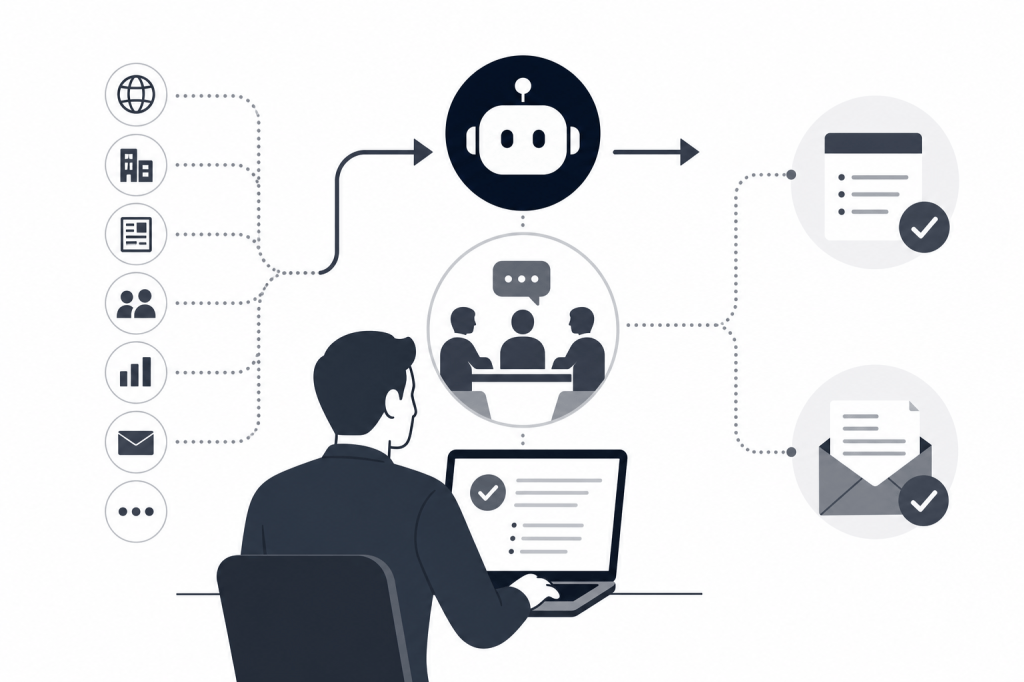
Baxter is built around a different premise: the AI should handle the full workflow around a meeting, not just the recording.
Before a meeting, Baxter automatically assembles a briefing by connecting to your calendar and pulling from over 12 external sources — including LinkedIn and Crunchbase — alongside your internal context from Gmail and Slack. You don't prompt it. You don't open a tab and start researching. The briefing is ready before the call starts.
During the meeting, Baxter records and transcribes the call, just as Fireflies or Fathom would.
After the meeting, Baxter drafts follow-up emails based on what was discussed, syncs structured notes to HubSpot, and tracks next steps. If a conversation surfaces new leads — say, a portfolio company CEO mentions three potential customers — Baxter can surface and organize those contacts.
The key distinction is that Baxter operates as a zero-prompt background agent. You don't ask it to research someone. You don't ask it to draft the follow-up. It handles those tasks while you focus on the conversation itself.
For PE and VC professionals managing dozens of portfolio relationships, or BD teams running high-volume outreach, that difference in workflow design is significant.
Comparison Table: Pre-Meeting Research and Post-Meeting Follow-Up
| Capability | Baxter Intel | Fireflies.ai | Fathom | Avoma |
|---|---|---|---|---|
| Pre-meeting briefing (auto) | Yes — from 12+ external sources | No | No | No |
| External data (LinkedIn, Crunchbase) | Yes | No | No | No |
| Live call recording and transcription | Yes | Yes | Yes | Yes |
| Post-meeting follow-up drafting | Yes | No | No | No |
| CRM sync | HubSpot | HubSpot, Salesforce, others | HubSpot, Salesforce, others | HubSpot, Salesforce, others |
| Conversation intelligence / coaching | No | Basic | Basic | Yes |
| Zero-prompt autonomous operation | Yes | No | No | No |
| Pricing | See joinbaxter.com | Freemium; paid tiers available | Free tier; paid tiers available | Paid tiers; see Avoma site |
The trade-offs are clear. If your primary need is call coaching, rep performance analytics, or team-wide conversation intelligence, Avoma is the most capable of the three. If you want clean, fast transcription with a generous free tier, Fathom is hard to beat. If your team needs CRM-connected transcription with collaboration features, Fireflies is a reasonable choice.
But if you need an AI that handles the research before the meeting and the outreach after it — without manual prompting — none of those tools do that. Baxter does.
Who Gets the Most Out of Baxter
The professionals who benefit most from Baxter tend to share a few things: high-stakes, relationship-driven meetings where showing up prepared matters; a large number of contacts to manage across a CRM; and real time lost to research and follow-up tasks that feel manual and repetitive.
That describes most PE associates running deal sourcing, VC partners managing portfolio relationships, wealth managers tracking client context across dozens of accounts, and B2B sales reps working complex enterprise deals.
For those users, the value isn't just convenience. Walking into a meeting already briefed on a contact's recent activity, current role, and your shared history changes the quality of the conversation. And having a follow-up email drafted and ready to review within minutes of hanging up means deals don't stall in the gap between "good meeting" and "next step."
You can see how Baxter fits into that workflow at joinbaxter.com.
FAQs
Does Baxter replace Fireflies.ai or Fathom entirely?
It depends on your use case. Baxter handles recording, transcription, and CRM sync alongside pre-meeting research and post-meeting drafting, so for many users it replaces both. Teams that rely heavily on call coaching analytics or rep performance dashboards may still find value in Avoma alongside Baxter.
Does Fireflies.ai do any pre-meeting research?
No. Fireflies activates when a meeting starts and focuses on capturing and organizing what's said during the call. It doesn't pull external data about contacts or companies before the meeting begins.
Which CRMs does Baxter support?
Baxter syncs with HubSpot. It does not currently integrate with Salesforce.
How does Baxter build the pre-meeting briefing?
Baxter connects to your calendar to identify upcoming meetings, then pulls from over 12 external data sources — including LinkedIn and Crunchbase — as well as internal sources like Gmail and Slack to build a contact and company profile ahead of the call. This happens automatically, without any manual prompting.
Is Baxter a good fit for PE, VC, or wealth management professionals?
Yes. Baxter is particularly well-suited to relationship-driven roles where meeting preparation and follow-up quality directly affect outcomes. PE and VC professionals managing deal flow, portfolio relationships, or LP communications are a strong fit.
Does Avoma do pre-meeting research?
No. Avoma is a conversation intelligence platform focused on what happens during and after calls — talk analytics, deal health scoring, and coaching. It doesn't autonomously research contacts or companies before a meeting.
What does "zero-prompt" actually mean?
Baxter works in the background without requiring you to ask it to do anything. It detects upcoming meetings from your calendar, runs research automatically, records the call, and handles post-meeting tasks like drafting follow-ups and syncing notes to HubSpot — all without manual input.
The Real Gap in the Market
The tools most often cited for pre-meeting research and post-meeting follow-up don't actually do pre-meeting research or post-meeting follow-up. They do meeting capture — which is valuable, but it's a narrower job than the category name implies.
If you're evaluating AI assistants for the full meeting workflow — preparation, capture, and follow-up — the comparison looks different than most roundups suggest. Baxter is built for that full cycle. Learn more at joinbaxter.com.


Leave a Reply