- What "Revenue Intelligence" Actually Means
- The Core Capabilities Sales Teams Need
- Why the Category Splits Into Two Tiers
- What Data Sources Actually Power Good Revenue Intelligence
- CRM Integration: The Difference Between Useful and Transformative
- What Sales Teams Actually Get Day to Day
- Evaluating a Revenue Intelligence Platform: What to Ask
- The Security Question for Enterprise Teams
- Where Revenue Intelligence Is Heading in 2026
- Frequently Asked Questions
A revenue intelligence platform promises to make your sales team sharper, faster, and better prepared. But the category has gotten crowded enough that the term now covers everything from basic call recording to full AI-driven deal management. If you're evaluating options in 2026, the gap between what different tools actually deliver is significant.
This article breaks down what a revenue intelligence platform should do, what sales teams realistically get from one, and where the category is heading.
What “Revenue Intelligence” Actually Means
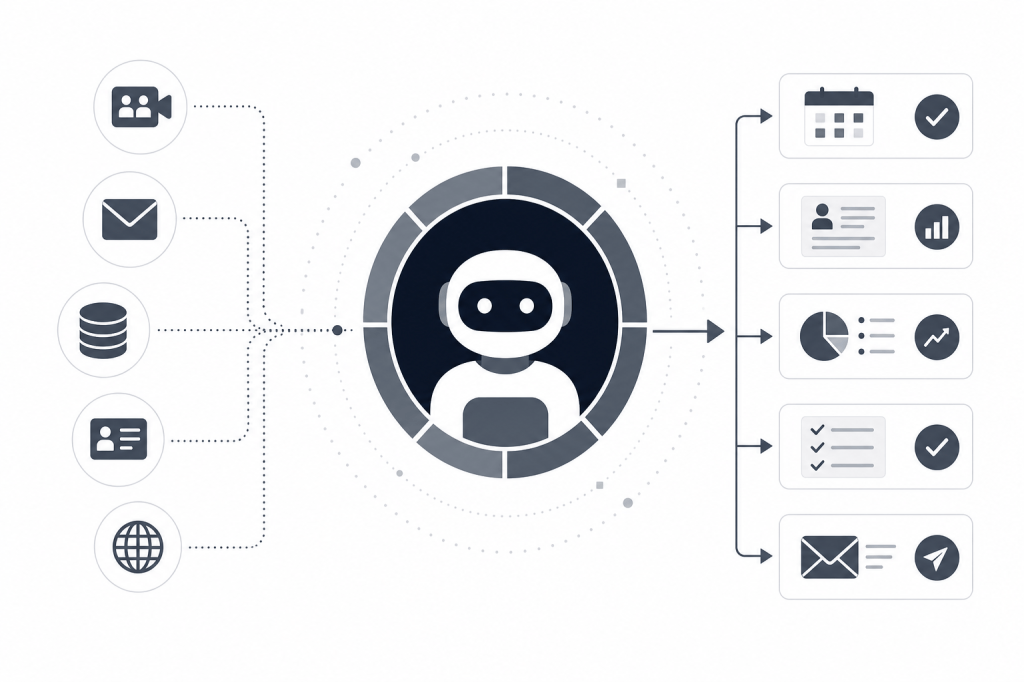
The phrase gets used loosely. At its core, a revenue intelligence platform aggregates signals from across your sales workflow — meetings, emails, CRM activity, contact history — and surfaces them in ways that help you act faster and more accurately.
The practical output looks like this: you walk into a meeting knowing exactly what was discussed last time, what's still open, and what's changed at the prospect's company since you last spoke. After the call, your CRM updates itself, follow-up drafts are ready, and nothing falls through the cracks.
That's the promise. The reality depends heavily on which tool you're using and what it actually automates.
The Core Capabilities Sales Teams Need
Pre-Meeting Intelligence
Most sales reps spend 30 to 60 minutes manually preparing for a single meeting — pulling up LinkedIn, checking recent news, reviewing old email threads, trying to remember where the deal stands. That's time that doesn't scale.
A genuine revenue intelligence platform handles this automatically. Before a meeting starts, it should surface attendee backgrounds, company news, open action items from prior conversations, and relationship history without you having to ask. The briefing arrives because your calendar triggered it, not because you remembered to request one.
Live Capture and Transcription
Recording and transcribing calls is table stakes at this point. What matters is what happens with that transcript. Does it feed into contact records? Does it identify commitments made during the call? Does it connect to the broader relationship history you've built with that person over months or years?
Transcription alone is a commodity. The value is in what the system does with the content after the call ends.
Post-Meeting Automation
This is where most tools fall short. After a call, a rep typically needs to write a follow-up email, update the CRM, log tasks, and maybe draft a summary for their manager. That's 20 to 40 minutes of administrative work per meeting, and it compounds fast across a full pipeline.
A strong revenue intelligence platform handles all of this without manual input. Follow-up drafts are generated based on what was actually said. CRM notes sync automatically. Tasks are logged. The rep reviews and sends rather than starting from scratch.
Relationship Intelligence
Deal context isn't just about the last meeting. It's about the full arc of a relationship: how often you've been in touch, whether engagement is warming or cooling, what commitments have been made and honored, and how strong the connection actually is.
Relationship strength scores and contact timelines give sales teams a way to prioritize. Instead of guessing which accounts need attention, you can see it.
Why the Category Splits Into Two Tiers
There's a meaningful divide between tools that record and summarize meetings and tools that operate as a proactive agent across the full sales workflow.
Meeting recorders capture what happened. Revenue intelligence platforms act on it. That distinction matters when you're managing a pipeline of 50 or 100 active relationships and can't afford to manually triage every follow-up.
The agentic layer is what separates the tiers. Does the tool wait for you to ask it something, or does it surface what you need before you know you need it? Does it push updates to your CRM, or does it wait for you to paste in notes? Does it enrich contact records from external sources, or does it only know what you've told it?
What Data Sources Actually Power Good Revenue Intelligence
The quality of intelligence is directly tied to the breadth of data a platform can access. A tool that only reads your calendar and email has a narrow view. One that also pulls from LinkedIn, Crunchbase, company news feeds, and your internal Slack threads has a much richer picture.
For sales teams in B2B, private equity, or venture capital, this matters enormously. A contact's recent promotion, their company's latest funding round, or a news story about a competitor can all change how you approach a conversation. If your platform isn't surfacing that, you're doing the research yourself.
Baxter pulls from 12 or more external data sources — including LinkedIn and Crunchbase — alongside nine or more internal integrations covering Gmail, Slack, and Google Calendar. That breadth is what makes pre-meeting briefings genuinely useful rather than a summary of things you already knew.
CRM Integration: The Difference Between Useful and Transformative
Revenue intelligence only compounds in value if it feeds back into your CRM reliably. A platform that generates great insights but requires manual copy-pasting defeats the purpose.
Two-way CRM sync is the standard to hold tools to. Notes, tasks, and tags should flow in both directions automatically. When a contact record updates in your CRM, the intelligence platform should reflect it. When the AI captures a commitment during a meeting, it should log to the CRM without you touching it.
Baxter's native HubSpot integration supports exactly this: two-way sync of notes, tasks, and tags. For teams running HubSpot as their CRM of record, that means the system stays current without anyone having to maintain it manually.
What Sales Teams Actually Get Day to Day
Here's what the workflow looks like when a revenue intelligence platform is working properly.
You have three meetings on Thursday. Wednesday evening, briefings arrive for each one — who's attending, what was discussed in prior calls, what's still open, and what's changed at each company recently. You spend five minutes reviewing instead of 45 minutes researching.
During each call, the meeting is recorded and transcribed. The AI is tracking commitments, questions, and next steps in real time.
After the last call, follow-up email drafts are ready for each meeting. CRM notes have already synced. Tasks are logged. You review, adjust if needed, and send. Your pipeline is current before you close your laptop.
That's not a hypothetical workflow. It's what the category is capable of delivering when the agentic layer is actually built in rather than bolted on.
Evaluating a Revenue Intelligence Platform: What to Ask
Before committing to a platform, these questions will separate tools that genuinely automate from those that just assist:
Does it operate without prompts? If you have to ask it for a briefing or tell it to sync your CRM, it's not fully agentic. The value is in what it does before you think to ask.
How many data sources does it pull from? A narrow data set means narrow intelligence. Ask specifically what external sources feed into contact and company enrichment.
What happens after the meeting ends? This is the most revealing question. If the answer is "you get a transcript and a summary," that's a meeting recorder. If the answer includes follow-up drafts, CRM sync, and task logging without manual steps, that's a revenue intelligence platform.
Is CRM sync two-way? One-way sync means you're still maintaining records manually in one direction. Two-way means the platform and your CRM stay in step automatically.
What does it actually cost to use? Some platforms reserve the most useful features for enterprise tiers. Baxter's free plan includes CRM sync and the Baxter Agent — meaningful for teams that want to test before committing. The Pro plan at $44 per seat per month adds unlimited meeting transcription and notes. The Business plan at $89 per seat per month, for teams of 10 or more, adds unlimited CRM sync, unlimited storage, and MCP access.
The Security Question for Enterprise Teams
Revenue intelligence platforms sit at the intersection of your calendar, email, CRM, and meeting content. That's sensitive data. SOC 2 certification is the baseline standard for enterprise-grade security, and it should apply across all plans — not just the top tier.
All Baxter plans are SOC 2 certified. For enterprise organizations of 400 or more, the Enterprise plan adds custom data retention and enterprise-grade security controls at custom pricing.
Where Revenue Intelligence Is Heading in 2026
The category is moving toward deeper agentic behavior. The next step beyond automating post-meeting tasks is proactive outreach: the platform noticing that a relationship has gone quiet and drafting a re-engagement message before you've spotted the gap. Or identifying a new contact at a target account and surfacing them with context before you've thought to look.
Model Context Protocol (MCP) access, available on Baxter's Business plan and above, points in this direction. It allows the AI agent to operate across tools and workflows beyond the meeting lifecycle itself, connecting intelligence to action at a broader level.
The teams that will benefit most from this shift are those managing dense relationship networks where the volume of contacts makes manual attention impossible. Private equity, venture capital, and enterprise B2B sales are the clearest examples — but any team where relationships compound over years rather than close in weeks will feel the difference.
Frequently Asked Questions
What is a revenue intelligence platform?
A revenue intelligence platform aggregates data from your meetings, emails, CRM, and external sources to surface insights that help sales teams prepare better, follow up faster, and maintain more accurate pipeline records. The most capable platforms automate tasks like CRM updates and follow-up drafts without requiring manual input.
How is a revenue intelligence platform different from a meeting recorder?
A meeting recorder captures and transcribes calls. A revenue intelligence platform uses that content as one input among many, combining it with contact history, relationship data, and external signals to automate the full meeting lifecycle — including pre-meeting briefings and post-meeting CRM sync.
What should I look for in a revenue intelligence platform?
Look for agentic automation (the platform acts without prompts), broad data sourcing (external enrichment beyond just your own records), two-way CRM sync, and post-meeting task automation that covers follow-up drafts, note logging, and task creation. Security certification matters too, especially when you're handling sensitive deal information.
Does a revenue intelligence platform work with HubSpot?
Baxter integrates natively with HubSpot via two-way sync, covering notes, tasks, and tags. Not all revenue intelligence platforms offer two-way sync — some only push data in one direction, which still leaves manual CRM maintenance on your plate.
What data sources does a revenue intelligence platform use?
The strongest platforms pull from both internal sources (your calendar, email, CRM, Slack) and external ones (LinkedIn, Crunchbase, company news). Baxter connects to 12 or more external data sources and nine or more internal integrations, which is what allows it to generate genuinely useful pre-meeting briefings.
Is there a free version of Baxter?
Yes. Baxter's free plan at $0 per month includes pre-meeting, during-meeting, and post-meeting intelligence, CRM sync, and the Baxter Agent. Unlimited features — including unlimited meeting transcription and unlimited CRM sync — are available on paid plans.
Who benefits most from a revenue intelligence platform?
Teams managing large, high-value relationship networks see the most impact: private equity and venture capital professionals, B2B sales leaders, and business development teams at firms where relationships compound over years. The more meetings you're running and the more contacts you're managing, the more the automation compounds.
If your team is spending significant time on meeting prep, CRM maintenance, and post-call follow-up, a revenue intelligence platform is worth a serious look. The gap between a tool that records calls and one that automates the full workflow is large enough to change how your pipeline actually moves. Learn more at joinbaxter.com.


Leave a Reply